
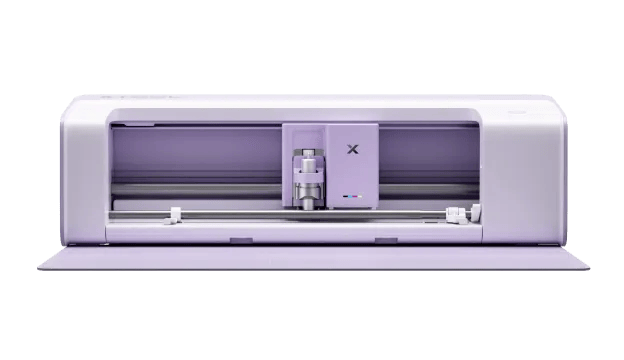
Could this new scan, print and cut machine give the Brother ScanNCut a run for its money?
Let’s tale a look…

The new xTool C1 Colour Cutter. Image courtesy of xTool.
Well, hello there!
Now then, something rather interesting has popped up in the world of electronic cutting machines, and I thought it was worth sharing with you.
If, like me, you’ve spent a fair bit of time around electronic cutting machines, you’ll know that there are a few familiar names that tend to dominate the conversation. Brother, Cricut and Silhouette have all established themselves in craft rooms across the country.
However, it looks as though another manufacturer is preparing to join the party.
Say hello to the new xTool C1 Colour Cutter.
And, from what I’ve seen so far, this isn’t just another machine that cuts shapes from cardstock.
Oh no. This one has a rather interesting trick up its sleeve.
So, What Exactly Is the xTool C1?
You may already be familiar with xTool through its range of laser cutting and engraving machines.
Well, the company has now turned its attention to the electronic craft cutting market with a machine that brings together three functions:
- Scanning
- Full-colour printing
- Blade cutting
All in one machine.
Yes, you read that correctly. This machine can apparently scan your artwork, print full-colour designs and cut them out without needing a separate printer.
That last point is particularly interesting.
Most electronic cutting machines can cut printed designs, but they generally rely on a separate printer to produce the artwork in the first place.
The xTool C1 aims to bring those processes together into one workflow.
For anyone making stickers, decorative elements, greeting cards, labels or personalised gifts, I can certainly see the attraction.
A Built-In Scanner? Now That Sounds Familiar!
If you’re a Brother ScanNCut owner, there’s a good chance your ears pricked up at the mention of a scanner.
After all, the built-in scanner has long been one of the ScanNCut’s most distinctive features.
Being able to place a stamped image, drawing or piece of patterned paper onto the cutting mat, scan it and cut around the design has been a hugely useful feature for papercrafters.
And it’s something that has helped distinguish the Brother machines from much of the competition.
The xTool C1 appears to be entering similar territory.
According to xTool, the machine can scan materials and display them on screen, allowing users to position cutting designs over the scanned image.
It also features an automatic contour function for cutting around existing artwork.

xTool demonstrates its automatic contour-cutting feature using printed illustrations. Image courtesy of xTool.
That could be very useful for those of us who enjoy stamping, colouring and incorporating our own illustrations into projects.
Of course, how accurately it works in practice remains to be seen.
And, as anyone who has spent time with electronic cutting machines will tell you, there can be quite a difference between watching a polished promotional demonstration and working with a machine on a busy craft table!
But Here’s the Really Interesting Bit: It Prints Too!
For me, this is where the xTool C1 begins to stand apart.
The machine includes a full-colour CMYK inkjet printing system.
In practical terms, that means you could potentially create a colourful design, print it and cut it without moving your project between two different machines.
Imagine creating a sheet of decorative embellishments for your handmade cards.
Normally, you might design the artwork on your computer, send it to your printer, transfer the printed sheet to your cutting machine and then cut everything out.
With the C1, xTool is promising a more streamlined process.

The xTool C1 shown working with a sheet of colourful printed designs. Image courtesy of xTool.
It also says its system can produce print-and-cut projects without the registration marks that some cutting workflows require.
That could mean more usable space on your materials, which is always welcome when you’re trying to squeeze as much as possible out of an expensive sheet of cardstock or sticker paper.
The company is also promoting its proprietary waterproof ink, with claims of wash-resistant results on suitable apparel materials.
Again, these are manufacturer claims rather than something I’ve personally tested, but they’re certainly worth investigating.
What About Traditional Papercrafting?
Now, colourful stickers and personalised T-shirts are all very well, but I know that many of you will be asking the same question as me.
What can it do with cardstock?
After all, for cardmakers and papercrafters, accurate cutting is only part of the story.
We also need to think about things like intricate designs, delicate papers, thicker cardstock, scoring, repeated cuts and precise positioning.
According to the information released by xTool, the C1 supports a selection of cutting tools, including fine-point, deep-point and other specialist blades.
There are also options for drawing and foil-transfer work.
Interestingly, xTool specifically mentions scoring fold lines, which could make it useful for creating card blanks, boxes and other three-dimensional papercraft projects.

An example of foil-transfer work using the xTool C1 and its optional hot foil-transfer tip set. Image courtesy of xTool.
The company lists support for materials including paper, cardstock, vinyl, fabric, leather and even certain thin wooden materials.

xTool advertises compatibility with a wide selection of creative materials, although some require special preparation or accessories. Image courtesy of xTool.
That sounds promising, although I’d want to see how well the machine handles everyday crafting materials before getting too excited.
For example, how does it cope with 300gsm cardstock? Can it reliably cut intricate decorative shapes? How cleanly does it score a fold? What happens when working with textured or pearlescent card?
Those are the sorts of things that matter when you’re actually making projects rather than simply admiring a list of specifications.
So, Could It Compete with the Brother ScanNCut?
I think the answer is yes, potentially — but perhaps not in quite the way you might expect.
The Brother ScanNCut has some very well-established strengths.
For starters, its built-in scanner is designed around a workflow that many papercrafters already know and love.
Importantly, the ScanNCut DX is also a standalone machine.
You can use its built-in touchscreen to scan, edit and cut designs without having to connect it to a computer.
For many people, that’s a major selling point.
The ScanNCut DX also offers automatic blade adjustment and has a long-established range of cutting, drawing and fabric-working functions.
The xTool C1, on the other hand, appears to be placing considerable emphasis on combining scanning, printing and cutting into one connected creative process.
And that could be a significant advantage for people who regularly create printed projects.
The C1’s built-in printer is undoubtedly appealing, but it doesn’t automatically make it a better cutting machine.
And if you already own a ScanNCut and a perfectly good colour printer, you might reasonably wonder how much benefit the combined system would provide.
On the other hand, if you’re just starting out and want to create printed stickers, labels, embellishments and other colourful projects, having everything in one machine could be quite attractive.
One Thing I Would Definitely Want to Investigate
Software.
Yes, I know. Not always the most exciting subject!
But, in my experience, the software can make an enormous difference to how enjoyable a machine is to use.
Brother’s standalone functionality means you don’t necessarily need a computer beside your machine.
The xTool C1 is being promoted alongside xTool’s design software and its Atomm creative platform, which offers project files and design-generation features.
That may appeal to some users, particularly those who enjoy designing on a computer.
However, I’d want to understand exactly what can be done without an internet connection, whether a subscription is required for any useful features, and how easily the machine handles designs created in other software.
I’d also be particularly interested in SVG compatibility and how much control users have over cutting and scoring operations.
There’s little point having a wonderfully capable machine if getting your own designs into it becomes a complicated exercise.
What About Consumables?
This is another area that deserves attention.
Adding a printer to a cutting machine sounds like a brilliant idea, but it also introduces ink cartridges and their associated costs.
How much will replacement cartridges cost?
How many projects can you reasonably expect to produce from one cartridge?
And how well will the printer cope if you only use it occasionally?
Those are important questions, particularly for hobby crafters who might go several weeks between printing sessions.
I’d also want to investigate the cost and availability of replacement blades, cutting mats and other accessories.
One detail worth mentioning is that xTool says the C1 can use third-party 12-inch cutting mats for printing and cutting, but its scanning function is not supported with those mats.
That could be an important consideration for anyone hoping to keep ongoing costs down.
A machine’s purchase price is only part of the equation, after all.
How Much Will It Cost?
According to the current xTool UK launch page, the advertised price for the basic C1 package is £449.
Reservations opened on 20 October 2026, with a £10 deposit.
The company is offering promotional benefits for early reservations, including an introductory materials package and a discount voucher for a future materials purchase.

The reservation incentives advertised by xTool at the time of writing. Image courtesy of xTool.
The official page indicates that UK shipping is expected to begin towards the end of November.
Several packages are planned, including one incorporating access to the Atomm membership service.
Naturally, I’d recommend checking exactly what’s included in each bundle, as well as the full purchase price and terms, before parting with any money.
You can find the latest information on the official xTool UK C1 launch page.
Would I Swap My ScanNCut for One?
Well, not so fast!
As interesting as the xTool C1 looks, I certainly wouldn’t be rushing to replace an existing machine based solely on promotional material.
The Brother ScanNCut has earned its place in many craft rooms because of its particular combination of scanning, cutting and standalone operation.
Those are valuable features, especially for papercrafters.
What the xTool C1 seems to offer is a different approach, with integrated colour printing as its headline attraction.
And I think that’s where its greatest potential lies.

An example of the colourful printed embellishments xTool is promoting for the C1. Image courtesy of xTool.
Rather than simply being another alternative to the ScanNCut, it could appeal to crafters who want to combine printed artwork and precisely cut shapes without juggling several pieces of equipment.
Whether that makes it a serious rival will depend on how well it performs those everyday crafting tasks that don’t always feature in promotional videos.
Precision, reliability, software flexibility, consumable costs and ease of use will all play their part.
For now, I think it’s fair to say that Brother has a potentially interesting new competitor to keep an eye on.
And a little healthy competition between manufacturers is rarely a bad thing for us crafters!
What Do You Think?
I’d genuinely love to hear your thoughts on this one.
If you already own a Brother ScanNCut, would the addition of a built-in colour printer tempt you to consider another machine?
Or is the ability to work directly on the ScanNCut’s touchscreen, without needing a computer, something you wouldn’t want to give up?
Perhaps you’re thinking of buying your first electronic cutting machine and the xTool C1 has caught your attention.
Whatever your thoughts, do pop them in the comments below.
I’m particularly interested to hear whether you think a combined printer and cutter is something you’d actually use, or whether you’d prefer to keep those jobs separate.
As always, thanks for stopping by, and happy crafting!
Please note: This article is based on information published by xTool on 20 October 2026, along with Brother’s published ScanNCut DX specifications. I have not personally tested the xTool C1, and its real-world performance remains to be independently assessed. Features, prices, promotions and availability may change.
All xTool photographs are promotional images sourced from the official xTool UK website.
Further information:
Share the love!
If you find this post fun, entertaining or useful, please do consider sharing it to your fave social platform using the handy buttons below.
Also, if you are feeling flush, a coffee wouldn’t go amiss! *cheeky wink.


Ok, that’s it for this post. I hope that you have enjoyed your time here today and will subscribe to my email newsletter so that you can hear about future posts.
If have not already done so, please feel free to pop your email address in the box below and I will add you to the list (you can unsubscribe at anytime in the future if I bore you with too many).
In the meantime, thanks for stopping by and I look forward to seeing you next time!
Much love,
John.


What I want, what I really really want is a machine that doesn’t use cutting mats. They are a pig to store in a small space, need care, the card doesn’t always stay stuck and they are not cheap to replace. I think your comments about the ink cartridges is a big one for me. I already have two printers, one laser for foiling and document printing and a Canon for better print quality and 12 x 24 printing. I don’t need or want a third….and certainly not one that will cost me that much!
LikeLike
What I want, what I really really want is a machine that doesn’t use cutting mats. They are a pig to store in a small space, need care, the card doesn’t always stay stuck and they are not cheap to replace. I think your comments about the ink cartridges is a big one for me. I already have two printers, one laser for foiling and document printing and a Canon for better print quality and 12 x 24 printing. I don’t need or want a third….and certainly not one that will cost me that much!
LikeLike