
*please note – there is now an updated version of this list of links here*
Hello all :)
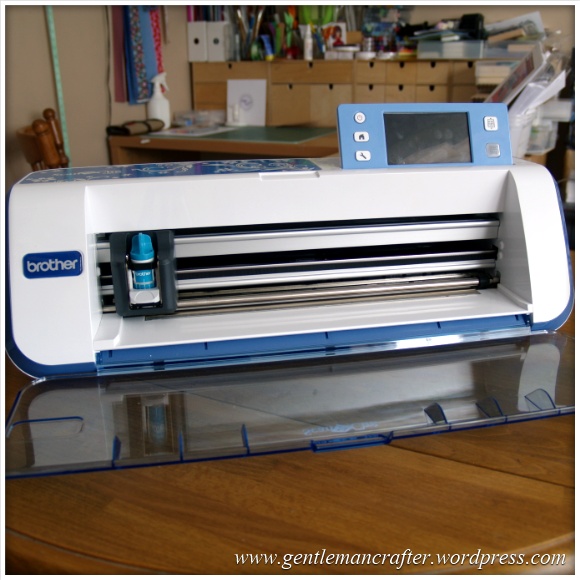
Well, both Mel and I have been overwhelmed by, and grateful for, the positive feedback from the Brother Scan N Cut shows on Create and Craft TV however there have been a lot of frequently asked questions asking for more information.
I have therefore trawled as much of the internet for you and collated a list of useful links that I hope will cover a lot of these FAQs.
Where To Buy
If you are thinking of buying this machine, and are located in the UK, you can get your Scan N Cut machine exclusively from Create and Craft TV.
More Info
Brother Scan N Cut Website
In honesty, a lot of commonly asked questions could be answered with a quick poke around the Brother Scan N Cut website. You can find it by visiting http://www.brother-usa.com/ScanNCut/
User Manual
Not a common request, but probably one that a lot of you could take advantage of. It’s the instruction manual. Yes, the very one that I didn’t bother reading when I first switched on my machine! Might give you some good reading and help you understand how the machine works and what it can really do.
The user manual can be downloaded from here – http://www.brother-usa.com/VirData/Content/en-US/ScanNCut/Consumer/UsersManual/CM100DM_CM550DX_User_Manual_English_1.pdf
Other Documents
Want to see the other documents that are included with the bundle from Create and Craft TV? You can find them all by visiting this support area – http://welcome.solutions.brother.com/bsc/public/eu/gb/en/doc/manual_top.html?reg=eu&c=gb&lang=en&prod=hf_cm600dxeuk
Scan N Cut Canvas
A lot of you have asked for a link to the Brother Scan N Cut Canvas online software so that you can start playing and designing. You can access this by visiting http://scanncutcanvas.brother.com
You will need to sign up for a free account in order to access this. Having the machine doesn’t make a difference, you can start designing now in anticipation of when you do receive your machine. All of the designs that you make will be stored online until you want to download them.
You can transfer your images to your machine by downloading them and putting them onto a USB stick which you can then insert into the machine.
Updates for the machine are likely to be advised here also.
Final link in this section would be to the help file PDF which is located here – https://scanncutcanvas.brother.com/Help/Help_ScanNCutCanvas_EN.pdf
Software Updates
The process for upgrading the software is listed in the instruction manual.
The software update will need to be downloaded onto a USB stick which you would then need to insert in your machine and perform the update.
According to the instruction manual, updates will be listed on the Brother Support website here – http://solutions.brother.com/
I have a feeling that they will also be listed on the home page for the Canvas software.
Videos
Some of you asked where you could see more footage of the machine in action.
Brother have been compiling a series of promotional videos and also videos from other users and reviewers on their YouTube channel. You can access it by visiting http://www.youtube.com/user/BrotherCrafter
Social Networks
I know that a lot of you are on Facebook, Twitter and Pinterest – and so is the Brother Scan N Cut – here are the links.
Brother Scan N Cut on Facebook – https://www.facebook.com/BrotherCrafter
Brother Scan N Cut on Twitter – https://twitter.com/BrotherCrafter
Brother Scan N Cut on Pinterest – https://www.pinterest.com/brothercrafter/
Copyright
There was initially some confusion on social networks and forums about this matter. To clarify, the ownership of this machine does not change the copyrights, terms of use or angel policy of ANY other product or image that you use in conjunction with this machine.
The purpose of having the built in scanning functions is really to give you the ability to design your own so that you don’t have to just rely on things that are already out there – which is a very exciting opportunity to me.
That’s It For Now
Anyway, this should give you lots of reference points no matter what you are looking to find out.
If however you have other questions, please feel free to list them below and (when I get time) I will be sitting down for many play days with my machine and also blogging some of the test results, projects and files for download in the future.
I hope this helps.
J :)
 GENTLEMAN CRAFTER
Hi John, love your work on C&C. Quiet, calm and informative. Love the Brother, cuts everything and I have competed lots of projects in the last few weeks, much better than the Silhouette. My problem is I was cutting paper, speed 2 and pressure 0 and the first sheet was fine. Second paper caught the blade on the edge of the paper (moral of the story, make sure the edges are firmly stuck down!) Now the blade is ripping the paper. Taken the blade out, checked no bits caught etc, does not look bent but still no go, have to assume I have taken the very edge of the blade off although I cannot see anything, and you still do not have replacement blades in stock. AHHHH! As others have said, what’s the point of a brilliant machine if you have not got the replacement parts.
LikeLike
Thank you John, will do.
LikeLike
Hi. John.Thank you for all your demonstrations on create & craft for scan n cut.
Could you please tell me if I can use the Sandisk Cruzer Edge 16 GB.usb.
The list only mentions the 4 & 8GB.
I have tried downloading the up grade with the 16GB,.but when I tried to transfer the up grade to the scan n cut I get this message.” Can not find this file”
Thank you.
Ann.
LikeLike
I cannot advise on individual USB sticks. Did you make sure it was empty first?
LikeLike
Yes it is empty, I have just bought it new.
LikeLike
Then that should be Ok. There are some comments here from users who have found certain USB sticks that work well. Perhaps you would like to try one of those?
J :)
LikeLike
Hi, I have had my ScanNcut for a short while now and have been cutting all sorts of fabrics and felts (Im a sewer). My standard mat had become rather “furry” and was losing its tackiness and I thought I had ruined it (I was using the applique adhesive but found the felt fibres still went onto the mat). But I have found a way of cleaning it and thought I would share it with you. Using the supplied spatula clean off as much debris as possible then with a standard baby wipe gently rub the mat and hey presto the fibres lift off. At first I though it wasn’t going to work because when the mat is damp it isn’t tacky, but as the mat dried it became tacky again :-)
LikeLike
Hi John,a big thank you for all your demos on C X C recorded them all in anticipation of my scan and cut arrival, It arrived 2 days before it was due I nearly gave the postman a heart attack he didn’t know whether to give me the box or get me to sign for it (he gave me the box) my hubby unpacked it and within 3 minutes it was going, Brilliant machine, I had a Wishblade for 7 years and never got to grips with it to much file changing etc,anyway just wanted you to tell all the C X C viewers NOT to throw their Spellbinders plastic packaging away but to use the flat pieces to cut out masks and stencils from with Deep blade on 4 pressure 1 cuts like a dream,I have had my S X C for 1 week and have 80 cutting files to use so simple to use,best machine on the market
Regards Glenys XX
LikeLike
Hi John with regard to cutting laminated card .I did this the other day, saved me loads of time used blade depth 4 .
LikeLike
Hi John, do you know if it is possible to cut decoupage like the Jayne Netley Mayhew sheets, or print outs from Crafters Companion?
LikeLike
This will depend on the image.
LikeLike
Hi, I too kept losing the stylus. I have fixed the plastic top off a quick n pick sewing tool on to the side for the scan N cut with gel glue dots. The stylus sits in it nicely and is just next to the screen ready for using.
LikeLike
Hi John Have just received ny Scan&Cut machine but when I followed the instructions for the blade(regular) first turning it to the right to tighten it on the holder then to the left to number 1 mark to cut my medium card the blade didn’t protrude out of the holder until about the number 4 mark.
How can I get the blade to cut both your and Mels tried and tested calculations if I cannot get my blade to cut at the No 1 mark The deep cut blade is Ok.Thankyou Janet M
LikeLike
Have you tried a an actual cut or are you making the judgement by eye?
LikeLike
John,
Watching you on C&C you say you keep loosing your spatula/stylus. You could put it in your shirt pocket, but would be great if they had a hole in top to thread ribbon/string to put around neck. At moment I put the stylus behind my ear :)
Julia
LikeLike
Good tip!
LikeLike
I have a strip of Velcro glued it on and the other piece went to the unit…
LikeLike
At last up and running.. After problems with USB stick and updates, I have cracked it. My USB wasn’t readable by the ScanNcut machine (didn’t realise USB’s were different, something to do with speed). Anyway, bought from well known large computer store SanDisk Cruzer Edge 8GB. All systems go :)
Julia
LikeLike
Glad to hear that Julia :)
LikeLike
Also experiencing difficulty with fabric cutting and I too am not a paper crafter so wanted this specifically for patchwork and quilting. I have adhered the fabric support sheet to my standard mat, so guess this is ruined for any other purpose. Low tack mat seems to have no stick at all – was hoping to use this to scan my own patchwork templates so not really sure what the point of this is. I have watched loads of the shows and took a long time to consider before making the purchase. What am I doing wrong?
LikeLike
I am hoping to put together a blog post soon establishing best tips for fabric use. Can I ask what type of fabric you are using please?
LikeLike
100% cotton craft (patchwork/quilting) fabric. Do you have any comments/suggestions regarding the lack of “stick” on my low-tack mat? Could I have used this mat with the fabric support sheet instead, and kept the standard mat for other tasks?
LikeLike
The low tack mat is not intended for fabric at all. It is not supposed to be very tacky as it is for using paper.
LikeLike
I completely understand that but mine isn’t even tacky enough to use with paper. So my query/suggestion is that, as it isn’t sticky enough to hold paper, and as the fabric support sheet is self-adhesive, could I have used the fabric support sheet on the low tack mat as I don’t do paper?
LikeLike
The side that is tacky is for the fabric. The other side is not adhesive so needs a sticky carrier mat to stick to.
J :)
LikeLike
My projects on BS&C Canvas keep crashing … any clues?
And how do you clean the mats (apparently some of my card has loose backing!) have taken most off, but the ghosts still remain seem to remember they can be washed but can’t find which recording from C&C this was on!
Many thanks, have a feeling you might need to have a FAQ’s document as both of the above might have already been addressed! You’re a star!
LikeLike
There are FAQs in the manual, on Create and Crafts website and on the scan n cut website.
In relation to the canvas query I am unable to diagnose/respond to technical queries of this nature and would recommend that you contact Brother directly.
As for the mats and card sticking, perhaps rub the leftover card with a damp cloth (no soap).
Hope this helps.
LikeLike
My USB stick doesn’t work. Anybody out there used one that does works, can you please tell me which one and WHERE you bought it. Thanks.
LikeLike
I got a Sandisk Cruzer Edge 8GB from the supermarket beginning with T (sorry don’t know if can say name. Think someone else used this USB stick as well. Its on the can use list, so just saving you searching the shops. HTH
LikeLike
Tesco?
LikeLike
I really do not think we should go out and buy a usb…this was never mention…the demo scans and cut….not usb and cut…
LikeLike
Hi Nancy, The USB is for additional storage (there is storage space on the machine) and for transferring files between a computer and the cutting machine. It does not affect the overall operation of the machine.
Mel and I have mentioned this numerous times. I am not familiar with the marketing activities in the United States.
J :)
LikeLike
Hi John, hope you can help. I have my snc machine and I also have a silhouette cameo. I have tried saving my designs to USB to convert using the canvas software, but have no idea how to do this. Please help. I have also tried printing the and scanned them into the snc, but when I save them some of the straight cutting lines are disjointed. Any idea why? Would it be better to cut them on my cameo and then scan them in? I know you are extremely busy but I’m nearly at my wits end on what to do
LikeLike
Another blog reader has given an idea on how to convert this type of file. I don’t have much experience on the cameo so can’t really advise.
LikeLike
John.
Sorry to seem slow, when using the Scanncut canvas I am trying to get a specific size rectangle (50mm x 98mm) but cannot get it exactly that size grabbing the resize points. Is there a way to tell it the size. Have had a quick scan through the site PDF but not seen anything,
Regards
Becki
LikeLike
The dimensions are listed bottom left of the edit screen I believe.
LikeLike
hi John again :)
I have bought the S & C for cutting fabric and my machine wont cut it without dragging it. I have tried the adhesive mat given and starched and even stick and spray. I have also tried different depths of blade and pressure. Unfortunately cutting through the mat. I am disappointed and this has been bought by me for quilting and applique. I have read instructions through and followed their instructions.( I am very disappointed with the manual / instructions given with the machine). I have trawled the website but no one tells what depth or pressure to use.
Its great for card cutting and ive tried different card stock from paper to heavy weight with great results but it hates fabric.
Am I doing something wrong. I have sewn years so I know its not the type of fabric I am using.
I am thinking of sending it back. How do I stand as the mat is damaged.
Can I point out however I have been happy with everything else I have bought from
Create and Craft.
Regards
chrisi
darlington.
LikeLike
Chrisi, what fabric are you using?
LikeLike
I have found that is you spray fabric with spray starch it does help on some fabric’s works well on dupon which is quite a shiny fabric, did not use the fabric stabliser either.
LikeLike
Hi Christine, I’ve asked John about the same, as I have exactly the same problems as you. Found the instructions very disappointing, and though easy to get started, and great to use with cardstock, my material drags and cuts poorly.
I use mainly cottons and poly/cottons with iron on backing and Bondaweb ( so it can be washed) and have tried spraying with starch, but it is no way the same as on c&c demos. Like you, I’ve nearly cut through the mat, which is already heavily marked after only a few days, and am seriously thinking of sending it back due to the high cost.
Let me know if you have any more success.
LikeLike
I cut on number 5…..how is ur scanning working?
LikeLike
Hi John
I don’t know if you have covered this and I have missed it, but could you please advise me of how we stand when using the Silhouette shapes (either my design, downloaded/bought designs and my design using Silhouette shapes) on the brother. Also can shapes outside the scanNcut canvas be pasted on when designing?
Many thanks for your help.
Emma
LikeLike
I’m not quite sure what you mean about “where we stand”. Do you mean “can you use the .STUDIO files in the Brother machine, if so, no. The machine accepts .FCM cutting files only so you would potentially need to export them from the Silhouette design studio somehow and then import them in the native format. I believe that someone else has given a guide on how to do this but I am not sure how that process works as I am not familiar with the workings of the silhouette software.
J :)
LikeLike
Hi John
I received my fabulous scan n cut this afternoon and have been having a play.
I have tried to download the update, but haven’t managed to do it. I wonder if you’d be able to give step by step instructions, for the less computer literate among us.
Thank you for all your help and support, which is much appreciated.
Jan in Coventry.
LikeLike
Jan, there are step by step instructions on the web page where you get the download – might be worth having a read of those.
LikeLike
Hi John know you are overloaded with questions about Scan and Cut but what is holding me back is copyright issues relating to images and fonts that are preloaded already on the brother machine. I sell my cards and want to use the Brothers fonts and images. Do you know where we stand on this. Would appreciate a reply as this is a vital issue.
LikeLike
Julie,
The angel policy states that you can make and sell handcrafted items, but cannot just cut a load of shapes and sell the shapes.
Hope that clarifies things for you.
J :)
LikeLike
HELP
Have just got my machine this morning but it will not work has a error message Initialisation of blade position failed the brother manual said turn the machine of the on again but this is not working.
thanks karen
LikeLike
I am afraid that I cannot advise you on this one Karen. You will need to contact the Brother support desk about this. There is a link to this on the side of this blog (or bottom if viewing on a mobile phone).
J :)
LikeLike
Hi John
I’ve noticed that in the USA there are two machines one with 700 built in patterns and in Germany and the rest of Europe there will be a machine with 850 patterns etc
The machine in the Uk has 600. Will the extra patterns and text, fonts etc be available to the UK owners
Thanking you in advance
Bob
LikeLike
I’m not sure. I will ask.
LikeLike
One of the things that C&C made a lot of play on was that they had exclusive distribution rights in Europe amd UK. Why is there now talk of a different machine for Germany and the rest of Europe?
LikeLike
Hi John, you said that you were going to post a list of blade depths for different materials – have you done that yet as I can’t see it….? Thanks
LikeLike
No. A guide comes with the machine to get you started with common card weights which will cover the majority of what C&C sell. Mel has already put one on her blog. Sadly with running the two jobs at the moment, and answering all the questions that are coming through, the time that I have creating content for the blog is very minimal but I will get around to it.
LikeLike
Hi John
Could you please let me know how to find the list of USB’s, which are suitable for use with the Scan N cut, on the Brother website? I’ve had a look around the site and have failed to find it.
While writing, I would like to thank you and Mel for all your help with this fabulous machine. Can’t wait to get mine.
LikeLike
Hi John I have not yet made up my mind as I am still cocerded if c&c have all rights for a year and have allready run out of replacment parts ie Mats pens ect.It could be I will not be able to use it in the future as with my Imagine.
My second question is the blade depth :- if the paper/card stock can be mesuard in Microns Could this be used to calculate the blade settings.
My thanks
Katrina
LikeLike
Katrina – My experience – I received my ScanNCut on 3/2/14 – 3 days early. Purchased for applique and quilting. Did a test run with paper although not a paper crafter with brilliant results. Not so successful with my fabric – spoiled the mat. Can’t get another mat until after 24 Feb earliest and will be out of my 14 day returns policy – the same applies to most of the other products I tried to order. Got erasable pen but can’t get a holder. Also because so many products are out of stock you can’t take advantage of Multiline postage. I am optimistic at the moment as I don’t want to give up on the machine but it may go back due to the lack of stock issues as I’m not able to assess if it suits my purpose – what if that is the case for the next 12 months (worst scenario) – what’s the point of having a machine you can’t use – it appears you are already in that situation. I have emailed C&C. (John – have requested they forward my email on to you and Mel re my fabric cutting & look forward to receiving your comments). Hope this helps.
CaroC
LikeLike
I have not received your email Carol. Perhaps you would like to email me directly – there is a link at the top of this blog page.
LikeLike
Hi I’m back and yes I did get the ScanNcut and I must admit the cut is far better than my Imagine although I havent as yet produced anything as all my artwork is invested in the ImagineSo I have now have to invest into more artwok the list gose on and still now sign of back up from C&C If I dont get a reply soon I think it may go back evern though I do like this machine
LikeLike
Not sure why you need to invest more in artwork when you can create your own, for free.
LikeLike