
Over the years I have been asked about “the best” this, or “the best” that and I have always found that difficult as this is often subjective however when it comes to re-tacking my Scan N Cut mats, I have found one product that is streets ahead of the others, and it will save you money!
Want to see what has me so excited … ?
To begin with, let me say that I have probably tried them all. Pinflair Stencil Glue, Zig 2 Way Glue, along with a variety of other brands of repositionable adhesives in both liquid and aerosol form – and whilst each had their own merits and benefits and each is still reasonably good at some aspects of what it does, I have finally found the sticky mat adhesive for me – and you need it to!
As you may or may not know, I have been working with electronic cutting machines for over 15 years; first Cricut and Craft Robo (the predecessor of the Silhouette series of machines) and, for the last decade+, the Brother Scan N Cut, so I would hope that I have got sufficient experience on which to form this opinion.
But enough waffle, let’s take a look at the best cutting mat adhesive for the Brother Scan N Cut mats.
Which is the best cutting mat adhesive for the Brother Scan N Cut?
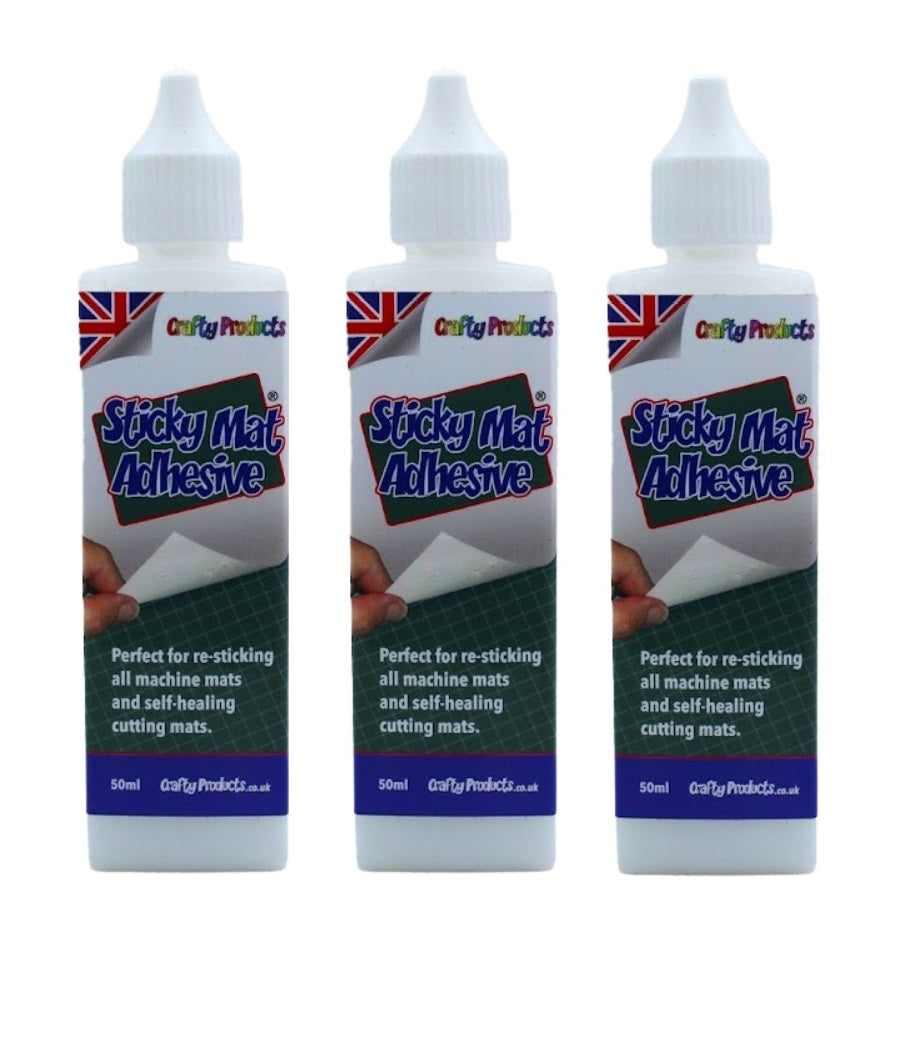
The best cutting mat adhesive for the Brother Scan N Cut that I have found, and thoroughly tested, is Sticky Mat Adhesive from Crafty Products.
Why is Sticky Mat Adhesive the best cutting mat adhesive?
Well, after many tests of this vs the others, I found Sticky Mat Adhesive to be the best for a number of reasons including efficacy (doing what it is supposed to), longevity (how long it lasts), affordability (price per use), and more.
But hang on a mo, let’s take a step back and take a look at what Sticky Mat Adhesive is as this is part of the reason why I think that it is the best cutting mat adhesive to breathe new life into your Brother Scan N Cut mats.
What is Sticky Mat Adhesive from Crafty Products?
Sticky Mat Adhesive from Crafty Products is a water-based acrylic adhesive specially formulated to remain tacky when dry yet allow you to reposition card or remove it from your cutting mat when finished without transferring any adhesive to your project.
Why is Sticky Mat Adhesive from Crafty Products the best?
Because it works!
As it is designed to stay tacky after it has dried means that your card will stay in place while cutting but – and this is something that the others have struggled with – there will be no transfer of adhesive on to your project when you come to take it off the mat making it ideal for retacking your old Scan N Cut cutting mat and it also lasts for a good number cuts, more so than the original adhesive, in my humble opinion.
Sticky Mat Adhesive is cheaper than a new mat.
Each 50 ml bottle offers multiple applications and so, at under £10 per bottle, less if you bulk buy, that works out so much cheaper than buying a new cutting mat for your Brother Scan N Cut.
Sticky Mat Adhesive is easy to apply.
It is REALLY easy to apply Sticky Mat Adhesive from Crafty Products.
- Mask off all areas of the mat except the main cutting area using masking tape (or even better, plumbers tape).
- Apply drops of the Sticky Mat Adhesive across the cutting area of the mat and spread thinly and evenly with a rubber brayer. (Wash the brayer in cold water right after gluing).
- Leave the mat to air dry for about 30 minutes to an hour.
- Replace the protective cover.
Done! Simple!
Following this easy application method and because Sticky Mat Adhesive has been developed for the purpose of retacking well-used cutting mats that have lost their “tack” I have found that there are no lumps, bumps or other inconsistencies that can cause issues – which I have found with some of the alternatives.
If you’d like to see me show how to apply it in a video on my YouTube channel, Scan N Cut Tutorials, please comment below and I will get that sorted.
What if the coat of Sticky Mat Adhesive loses it’s tack?!
All adhesive cutting mats gather dust, and other debris from the air around us and also some substrates shed microscopic particles as they are being cut. This can create a barrier between the adhesive and what you are trying to cut – if you’ve ever thought, “this mat isn’t as sticky as it was”, this is probably the reason why.
Anyway, it is the same no matter whether you are using the original mat adhesive, or have applied an alternative repositionable adhesive like Sticky May Adhesive from Crafty Products.
The good news is that restoring the tackiness of the Sticky Mat Adhesive glue is simple.
- Gently wash the mat using cold water with a tiny drop of dish soap and gently rubbing the surface with a soft kitchen sponge (not the scrachy part).
- Rinse with cold water and leave to air dry.
- Replace the protective cover.
This will exfoliate away the layer of debris and reveal the glue layer, restoring the mats sticky-ness.
After many uses, the efficacy of the adhesive will deteriorate, as would that of any glue. No need to spend time stripping the previous layer though. Just apply a fresh coat of Sticky Mat Adhesive from Crafty Products to your Scan N Cut cutting mat and you are good to go!
Where can I get Sticky Mat Adhesive?
If you would like to grab yourself a bottle (or three) of Sticky Mat Adhesive, you can get it directly from the Crafty Products website, just click the big button below – easy!
Oh, and make sure to quote code GENTLEMANCRAFTERUK at the checkout to get 10% off your entire order!
If you are in the UK, shipping is usually via Royal Mail and is free for orders over £35.
If you are not in the UK, don’t worry, Crafty Products ship overseas too! Whilst they have distributors in the USA, Canada, Germany (for EU) and Saudi Arabia they still ship directly to customers in those markets via their UK website.
For the United States, the new tariff is applied during checkout and goods are then sent via Royal Mail DDP (duty paid).
Anyway, here’s that big button that you need to click …
More about the Brother Scan N Cut
As I mentioned at the start of this posts, I have been demonstrating the Brother Scan N Cut for more than a decade and so, if you’d like to see what else I have created on this blog in relation to this awesome machine, do please check out the links below!


More Useful Scan N Cut Stuff
If you found this information useful, you may also like to check out these other resources …
My dedicated Scan N Cut Tutorials YouTube channel, by playlist.
- Scan N Cut Tutorials (CM Models) Playlist
- Scan N Cut Tutorials (SDX Models) Playlist
- Canvas Workspace (for PC) Playlist
- Canvas Workspace (for Web) Playlist
- Canvas Workspace (for Mobile) Playlist
Please remember to like, subscribe and for notifications of future videos, hit the bell notification icon too!
Facebook Group
If you’d like to join a growing group of Scan N Cut enthusiasts then please do come and join Gentleman Crafter’s Scan N Cut Facebook Group at https://www.facebook.com/groups/gentlemancrafters.scanncut.group/
SVG Cutting Files
Want access to a growing library of ready-to-cut projects including layered frames, creative card bases and fun 3D projects? Then please do come and check out my Patreon page at https://www.patreon.com/GentlemanCrafterUK
Ok, that’s it for this post. I hope that you have enjoyed your time here today and will subscribe to my email newsletter so that you can hear about future posts.
If have not already done so, please feel free to pop your email address in the box below and I will add you to the list (you can unsubscribe at anytime in the future if I bore you with too many).
In the meantime, thanks for stopping by and I look forward to seeing you next time!
Much love,
John.
 GENTLEMAN CRAFTER
Excellent article thank you :-)
LikeLike
No, No. Thank YOU!
LikeLike
Thanks so much for this very timely, and helpful, post. Your enthusiasm for the product, based on your own testing, makes me very keen to see you show how to apply it in a video on your YouTube channel.
LikeLike
Thank you, I will keep this in mind!
LikeLike