
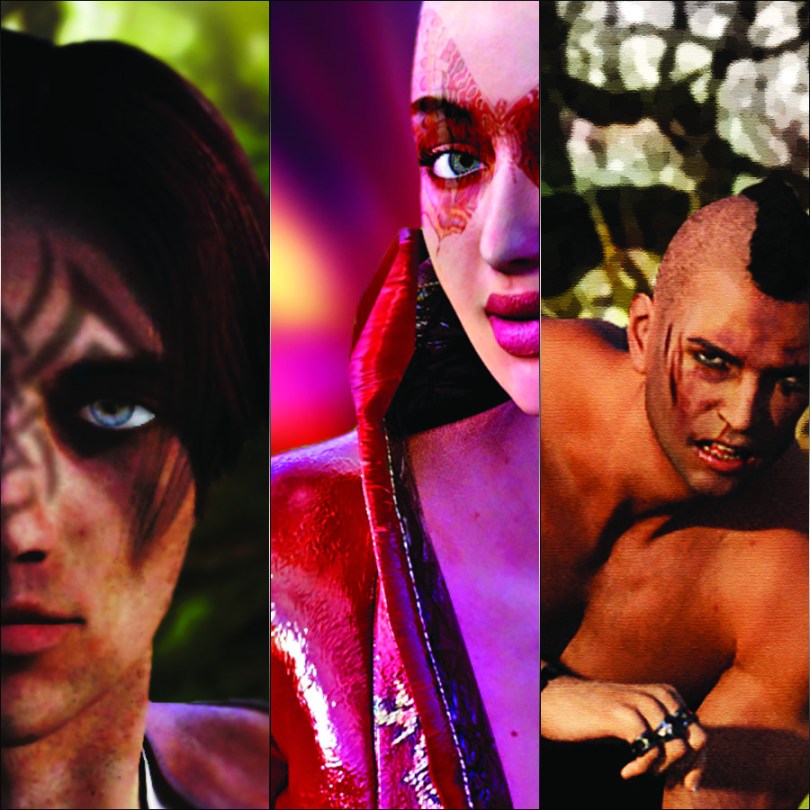
For the third and final image, I downloaded a new male model – now wouldn’t that be awesome in real life?! – and applied a pose.
I gave him some trousers – for modesty – some jewellery and a battered face – not literally or personally, it was just an option with the model and I thought it made him look quite butch.
Before rendering, I chose a different render style to see what difference it would make to the image.

Oof! He looks like he’s been through the mill!
Also, I wonder if I could get his phone number…? Lol!
Ok, yep, I think that I am getting the hang of this and now wondering how I could apply it to other areas of my creativity…
Anyhoo, hope you enjoyed this little foray into my little world of tinkering. I’ll try and share a few more in the future when I get the chance.
If you have any questions or comments, please feel free to leave them in the comments section below.
I look forward to hearing your thoughts.
Thanks for stopping by and I look forward to sharing more with you soon!
Bye for now.
J :)
 GENTLEMAN CRAFTER
Hi John
I love Daz3D, great for a “switch off and dabble”. Have also used it to produce 3D croquis as close to my size/ shape as possible for sketching clothing pattern ideas on to, gives me a clue to see if an item of clothing would suit my shape before I go to the time and effort of sewing it up. Also great if you’re learning to draw the human figure and aren’t lucky enough to have a model. seeing the model posed on a screen in 3d and sketching what you see has helped me a lot with my drawing.
Had to uninstall it recently as my hard drive is suffering a bit and needs an upgrade. Soon as I’ve organised the installation of a SSD it’ll be back on there!
Hope everyone is doing ok,
T x
LikeLiked by 1 person
Cool – then you can teach me! :)
LikeLike
You are very talented John, love them all they look amazing xx Hazel
LikeLiked by 1 person