
Well it seems like you liked the last quick tip so I’ve got another one for you.
This time it relates to the blade holder.
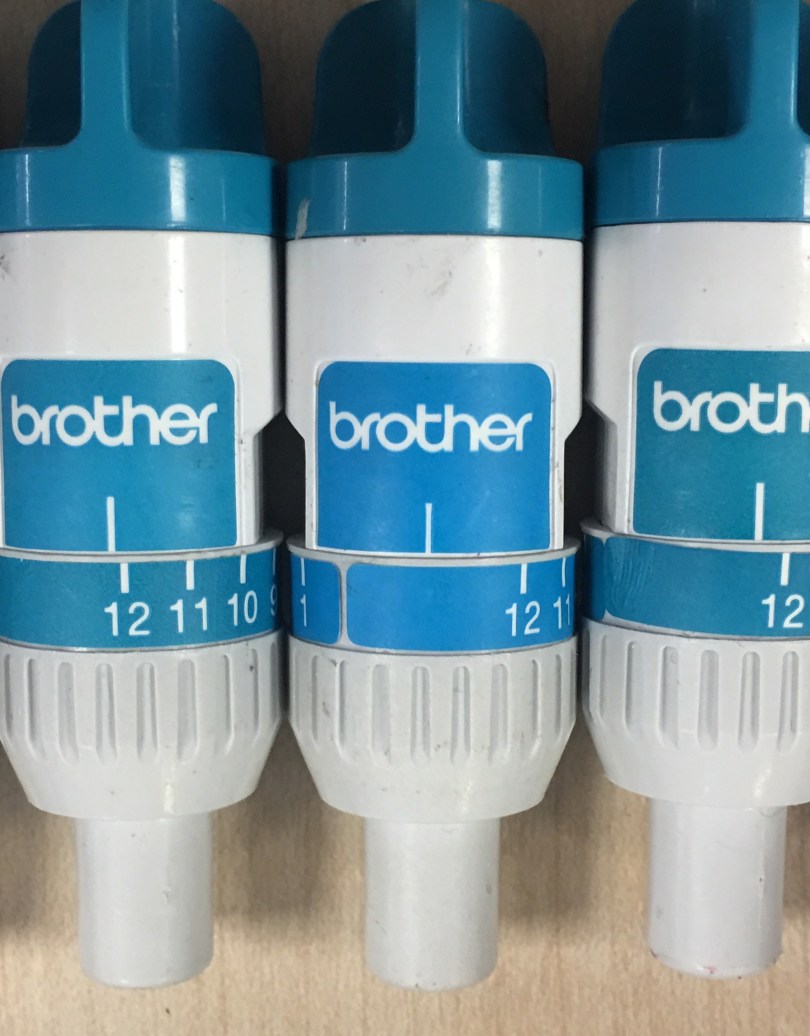
Here are five blade holders collected up during a recent workshop.
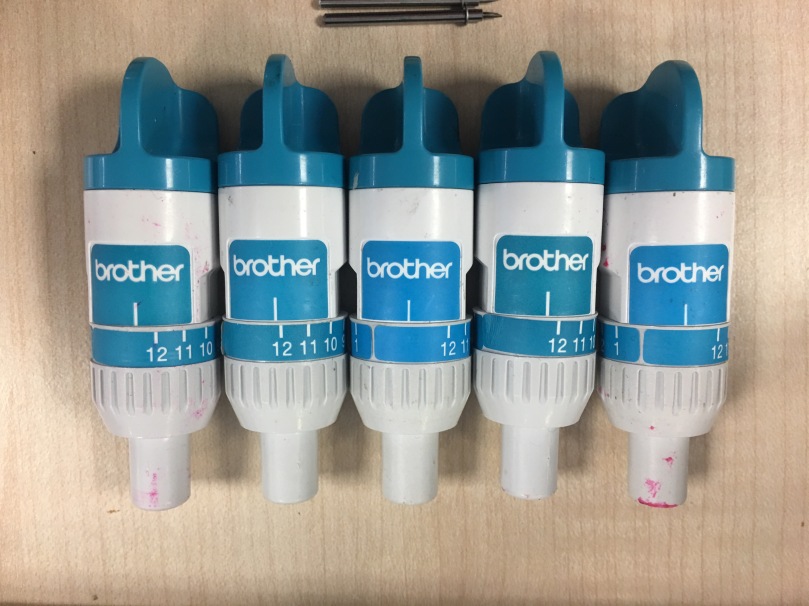
Hopefully you also notice how none of the blade adjustment number settings are in the same place.
Heres a closer look.
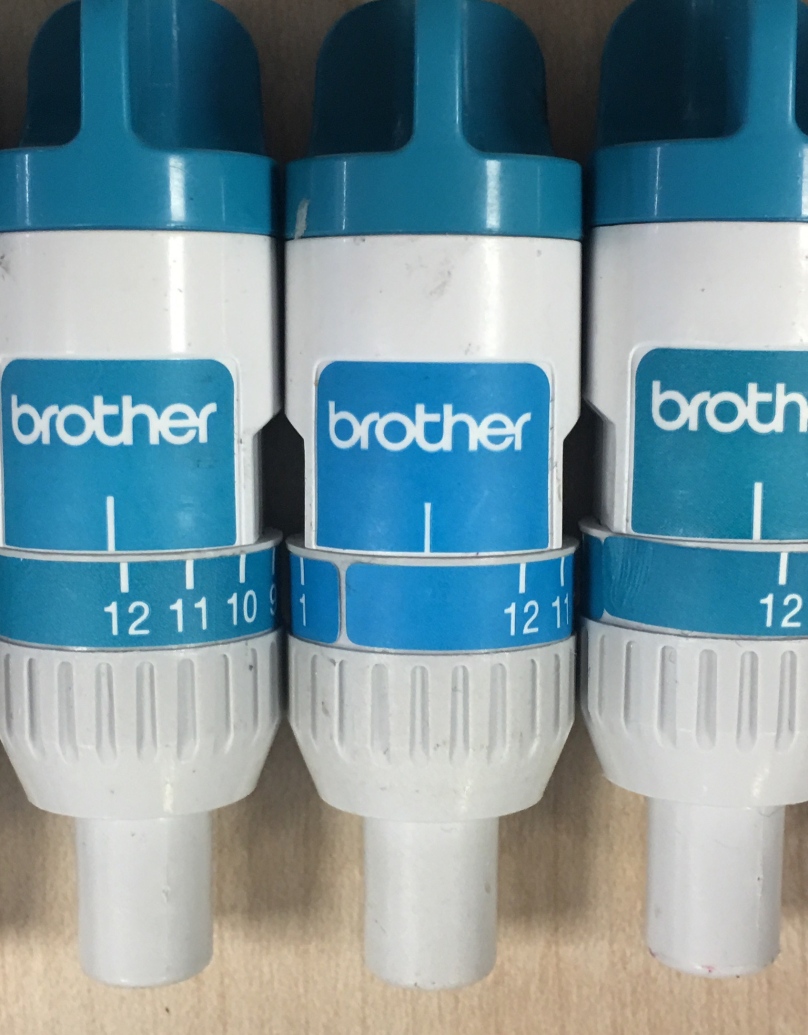
This will affect the results you get if you are following a settings guide.
Why?
Because when the blade carriage is put to its highest setting, which is 12, the mark above the twelve should line up with the mark just below the Brother logo.
You can clearly see on the middle one above that it is WAY off.
The simple fix?
Turn the blade holder until there is no gap between the top and bottom half and the carefully peel off the sticker with all of the numbers on, reposition it so that the mark above the 12 lines up with the line below the Brother logo and then stick it back down.
This could help alleviate some issues you may have found with blade depth settings however I would always still recommend doing a test cut to make sure that things are as they should be before committing time effort and resources to a complex twenty minute long cut.
Hope this helps!
J :)

 GENTLEMAN CRAFTER
Hi there
I have done some embossing and once I have put my blade back after I cleaned it the blade is not cutting the way it should.
LikeLike
Sounds odd. Have you made sure that the blade was fully inserted into the blade holder?
LikeLike
I’m in need of some help please if you have any advise for solving the following problem it would be deeply appreciated. On my model CM650W the error message initialization of the blade position failed. Turning off the machine then on again does not solve the problem is there any other solutions I can try to solve this problem ? Thank you I advance for your help.
LikeLike
For al mechanical and technical issues I would always recommend the Brother support team.
LikeLike
I had to get in touch with Mel Heaton as my scan and cut wasnt cutting even tho i waz using the right settings. I was getting quite upset wben as you say, all it took was to take the paper off and put it on properly as you said above.
Thank you for all your tips. Most helpful.
Linda
LikeLike
You, sir, are a bloody legend!
LikeLike
Thanks
LikeLike
Thank you John I checked mine and it was way out. Now changed I wondered why I was having to use a higher number than was recommended. Great tip. June
LikeLike
Hi John please can you help me my s&c c600 seems to have gone out of sync . If I press zero a 1appears and trying to scroll through the stored images takes some doing . How do I put it right
LikeLike
You need to perform a screen calibration. You can find info on how to do this step by step in the user manual.
LikeLike
Thank you
Will give it a go
LikeLike
Thank you for your tips John…I have been in contact with Mel (at C and C) pretty well constantly since a month after buying my machine in November 2014…it drives me mad! I’ve put a new blade in, sorted the blue strip, which was way out, as Mel suggested…it is slightly better but still ripping all my card, of various types including mirri card, which I use a lot. I wrote to Mel about two months ago to say I’d done the things she suggested but she hasn’t had time to reply yet, which is unusual as she’s normally quick at replying.
It will cut straight lines but nicks everything at the bottom right side and as for anything intricate there is no chance, just rips or some times doesn’t even cut in one area and will in another. I’ve had to return to dies. I just don’t know what to do… Anni
LikeLike
Anni, if this is still in warranty I would contact the Brother support help desk for advice.
LikeLike
John, thank you for suggesting I contact Brother. I did contact about 6 months ago but never got a reply. I have been following the tips/advice, as I’ve mentioned to little effect.
I contacted Brother last week, got a strange ‘frosty’ reception! I have to take/send the machine to Manchester, it will cost around £200 to mend. I know it is out of warranty but feel it is very unfair as I have been seeking/ taking advice etc. which is why the warranty ebbed away.
I’m going to contact the CEO of Brother and make my feelings known. Other people need to be aware not to wait whilst one lot advice follows another until they are out of warranty!
Regards Anni …. I have posted a congratulatory note on your well earned success.
LikeLike
Sorry to hear that your support experience hasn’t been the best however glad that you were able to get a response.
Once out of warranty any product will attract costs to repair.
Its not the same situation but did recently pay £65 to have a fault diagnosed on laptop to then be told it only needed a new power cable – £16. Gutting.
LikeLike
I understand about your Laptop, as annoying as it is. But had you been asking for advice for two years? As you can tell I’m not happy…I’m having a moan so no need to reply…Anni
LikeLiked by 1 person
I’m happy to email it to you if you would like to see it. Don’t know if I would be comfortable putting it up here because of the disclaimers you get at the bottom of all correspondence with them?
LikeLike
Thank you John, I am one clever cookie, because I nearly cut through my mat on the first run I played with the settings, no luck. I thought the sticker must be wrong so proceeded to peel it off and put on correctly. I am so glad that I have done something right. xx
LikeLike
Thank you for another excellent tip.
LikeLike
Thank you checked mine it was not lining up, tis’ now xx
LikeLike
Hello. I have found this post very interesting. I did exactly what you have described and was told by Brother that I had been given “bad advice” . They sent me a long detailed email as to exactly why that was the case. I was really upset with them – for another reason altogether about my machine and during the numerous emails back and forth with them this came up as yet another reason why my machine was not working as it should. They were going over all the different things that could have been caused my machine to not work and this was just one of them.
LikeLike
It seems to be odd that they would have alignment marks that don’t align. In addition I am often told that after doing this users get better cuts.
I’m not arguing with brother or justifying their communications with you but just saying that I’ve seen positive results after this change and that others might like to try it.
Sorry that you e not enjoyed your experience however I hope that you are now sorted.
LikeLike
Thanks John
I had been asking for almost the entire time that I had my machine. Time and time again I wrote to Create and Craft and asked for help with this. In all of the 3 years I never got one single reply. Then a few months ago a demonstrator showed how to take the little blue strip off and restick lining it up and I thought Yay finally. Long story short – it didn’t work very well at all. I ended up so very frustrated I put the machine back in the box. I wrote to Brother – who after my really upset emails (I have been moms carer for 10 years and she passed away in December) I took it out and thought right get it out of the box!
Nothing was going right at all with the machine. Due to my circumstances they contacted me and sorted it out. They were very specific about the little blue marker being moved! I got a two paragraph telling off! Anyway – I now have a brand new 900 and I am being so very very careful!!!
LikeLike
Well, I’d love to see that two paragraph telling off to see what advice they do have.
LikeLike
Hi John
Thanks for another great tip.
I had a problem with the blade and holder supplied with my machine. The cut worked perfectly for designs requiring few cuts, but for more intricate cuts taking longer, by the end there was hardly a mark on the card. I discovered that no matter how hard I tried to fix the blade in the holder, or what depth I set the blade by the end of a complicated cut it had completely retracted into the holder.
After consulting you and Mel I received a new holder and blade from Brother. Yippee no more problems. I still do not use this machine to its full potential, and like a previous comment l would dearly love you to come and live in my craft room.
Keep up the good work. Thanks for all your help and wonderful designs
Lois Stacey
Sent from my iPad
>
LikeLike
John you are a treasure, thank you x
LikeLike
I’ve been unable to use my scanncut,because I can’t get any standard blades,they are always out of stock at create & crafte,you would think that this would be always available.
LikeLike
Im not that involved with C&C much these days as I work for myself but I’m still sorry that you can’t catch it when it is in stock. I guess it’s hard trying to keep a popular item always available. Keep trying.
LikeLike
Thank you for this, John! I didn’t have any problems with the blades that came with my machine, but when I bought replacement blades, I went from cutting at a setting of 4 to cutting at a setting of 8😳 I checked my blade holder and sure enough, it was completely out of whack. I have followed your instructions and look forward to using these new blades. Thanks again!!!!
LikeLike
Wow you are just brimming over with great tips. While I like Sylvia’s thoughts on a beginners guide I would like to go one better and suggest you move into my pad…..thus giving me unlimited access to your cracking hints and tips lol. Mind you I had better put this passed my hubby first! Karen x
LikeLike
When/ if I do join planet Scan n Cut I shall be an expert thanks to you! 😆
LikeLike
Another goody John. Have you considered writing ‘A beginners guide to Brother Scan ‘n Cut’ or problems solved, hints & tips…something along those lines? I would be the first to subscribe. You have such a mine of information.
That is the big let down by Brother and one reason that it stayed in its box for so long. Brother do not give anywhere near enough information in the box to give you confidence to use it. It may be out there online but even as a beginner, or regular user, this is really offputting.
I am sure that other readers would agree. Maybe another fundraising idea for you.
Keep up the excellent work. We are all behind you with your challenge.
LikeLike
hanks for the SnC tips, John – very useful. I haven’t had any issues with my blade/housing at all, but thought I would check. I generally don’t use the minus settings and cut copy paper on 1. my housing alignment looked almost as bad as the centre picture, so i’ve re-aligned it now. I guess I will now have to adjust all the settings I’ve used for the last 3 years? Many hanks
LikeLike
Apologies but yes. You’d need to retest your settings. You’ll probably punch me if I said you could have stayed as you are as you had already worked out settings for your machine so I won’t say it.
LikeLike
John I have been aware of this. Pity it took me over 12 months to be aware and as a consequence got totally fed up with the machine that I bought at launch. One thing I notice from your picture is that the 2 bluest holders are way the most out of line. Mmm maybe too much of a coincidence and these came from a less than careful supplier!
LikeLike
I have not used the number guide since the first time I cleaned the blade. I hold the unit up to the light & eyeball how far the blade extends from the holder. Works every time.
LikeLike
Good idea.
LikeLike
Just received my special edition today still finding my way around the machine, thanks for the useful tips 😊
LikeLike
Yes I discovered this before and it really does make a difference. This is a great tip as is the previous one about the needles am going to check mine once I have finished this post. I bought the alphabet usb and I have managed to delete the sides off the letter G, is there anyway to retrieve the file or do I have to buy a new Usb. I know this question is going of topic and I am sorry, but I really do need help with this. Thank you.
LikeLike
I’m not sure but you might be able to email the team that make the USB or C&C customer service to ask if they can replace the files for the sides?
LikeLike
Not had problems yet but will file your tips for future reference. Many thanks. Liz X
LikeLike
Simple but very clever xxx
LikeLike