
Today I am bringing in the Brother Scan N Cut to the Artist Trading Card daily series.
It’s a tool that I truly cherish having in my craft room.
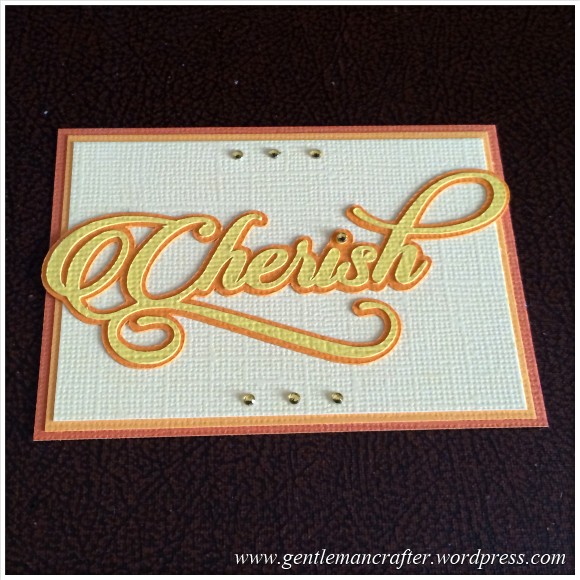
For this ATC creation I designed the word “Cherish” using a swirly font. I then converted it into the FCM format, transferred it to the machine and cut the layers from different coloured cardstock.
I then used the same coloured cardstock in order to create the layered background.
To be honest, the word was such a fancy design that I didn’t think that it needed much decoration so I just added a few Anita’s Mini Gems to the top and bottom of the ATC to finish it off.
Oh, by the way, I am sure that those of you with the Brother Scan N Cut cutting machines will want the word file so I have created an FCM version that you can download here. (You will need to Right-Click and “Save Target As” or something similar as neither file will open on your PC).
- > Download FCM “Cherish” top layer cutting file.
- > Download FCM “Cherish” shadow layer cutting file.
And there we have it, another ATC for the collection.
I hope that you like it and that it may inspire you to have a go at these manageable mini makes.
As always, if you have any comments or questions about this post then please feel free to use the comments section below. Also, If you know of anyone that would appreciate reading this post, there are handy sharing icons below.
Many thanks for taking the time to visit.
I’ll see you again tomorrow.
J :)
 GENTLEMAN CRAFTER
what is the card used to make cherish thank you x
LikeLike
It’s either American crafts or Papermania. It should be in the tag list on this post (sorry replying from phone so can’t see).
LikeLike
Many thanks for all your ideas and inspiration, as well as the cutting file for the Bro’. All the trading cards are so different and clever – wish I had a teensy-weensy bit of your crafty brain, but then that’s ok as you share your thoughts so that I can at least copy them.
Liz
LikeLiked by 1 person
another wonderful card. You continue to inspire me. Thanks for the file.
LikeLike
Loving the daily crafting inspiration with these ATC’s John – I look forward to getting them in my inbox every day. Thank you so much :) x
LikeLike
Thank you for shareing John & all the great ideas, xx
LikeLiked by 1 person
Lovely.
LikeLiked by 1 person
Ooooo John what a lovely font
thank you for the download I’m lovin the daily ATC xxx
LikeLiked by 1 person
This is so elegant John. It would make a beautiful placecard for a wedding, engagement r christening
LikeLiked by 1 person
Hi John I love all your ATC’s, I’ve looked in every day. Do you think you can answer a question for me. When I put my USB memory stick in the computer, it shows all the files I have saved on it. Am I able to rename the numbered files that I have saved to it from my SNC, or would this disrupt the files in some way? I only use this memory stick in the SNC.
Thank you for keeping me inspired
Love and Light
Sioux x x
LikeLiked by 1 person
You can rename them without causing any issues
LikeLike
Thank you John, it saves me keeping a numbere log
Love and Light
Sioux x
LikeLiked by 1 person
You’re right John, it needs nothing else. And many thanks for the cutting files! x
LikeLiked by 1 person
Lovely work John, and thank you so much for the fcm download – I just know this will be used extensively on my pages for my “cherished”grand children and Husband
LikeLiked by 1 person
Hi John,
I have really been enjoying your ATC series.
Thanks very much for sharing with us.
Carol
LikeLike
Here is another ATC. Told you I check back each day. Time to get my cricut out and earn it’s keep. Still not started my new year thing but who knows tonight might be the night. Pop back tomorrow and have a nosey
LikeLiked by 1 person
This is lovely, so elegant 😁
LikeLike
Looks great!
LikeLike