
So I’ve had mine for a couple of months, and it’s now only just over a week until the Brother Scan N Cut machines start shipping from Create and Craft TV so I thought that I would try and do a post per day this week to try and bring you up to speed with all of the things that I have tried, tested and discovered since I have had more time to work with it and to hopefully give you a head start for when yours arrives.
Most of the things that I will cover in this series of posts will also go on to cover a lot of the questions that you have sent to me via Facebook, Twitter and also this blog (thank you for all of those – you have kept me very busy indeed!)
First up I should say that I will be covering Working With Fabric and also The Brother Canvas design suite in more depth in separate posts later in the week, so if these interest you, please don’t forget to subscribe to this blog for email updates of when these posts are released.
Anyway, lets make a start …
Q: How Intricately Can The Machine Cut?
There are going to be a number of variables here.
- Complexity of design.
- Strength of medium being cut.
- Line Weight.
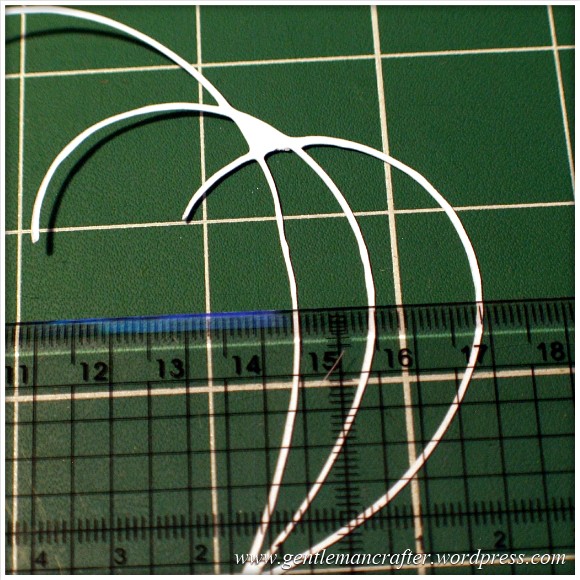
I decided to do quite a basic test for this post. I drew a few curved lines with an 0.5mm Pigma Micron pen and then used the Scan To Cut Data option.
I used a lightweight cardstock to test the cut.
This is the result.
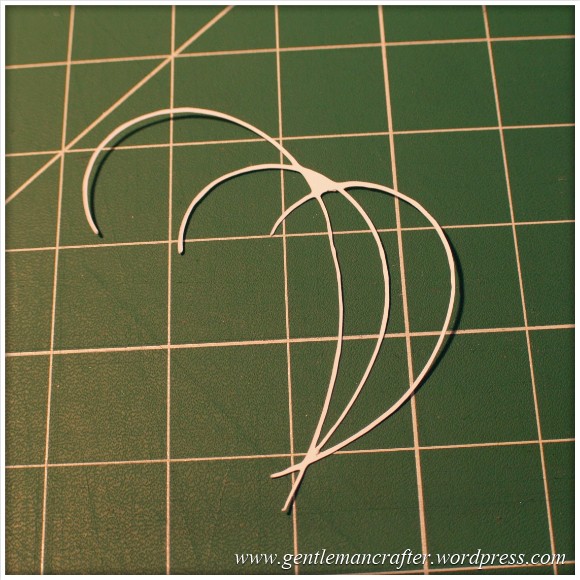
I did increase the size of the scan by about double in this test so the lines that were cut were approx 1mm thick as you can see here.

The machine even picked up the varying line thickness of the ink against the textured paper which I think was quite cool.
Anyway, here are the two side by side.

Conclusion: Not a bad result. I would however recommend starting bigger and decreasing the image rather than starting with a small image.
Also, unless ‘freehand’ is the look that you are going for, you will want to be fairly precise and use a ruler, french curve or other guide against which to draw your lines when hand drawing the design.
I used the standard mat as I was using cardstock. You will need to be very careful when removing intricate designs from the mat in order to prevent them from tearing – or perhaps do your design so that there are lots of overlapping lines so that there is more ‘structure’ to the overall design.
Q: Do I always have to stamp or print in black?
No. You can use most colours as long as there is a good contrast between the colour and the paper against which it is printed. Here is an example where I used four different colours to stamp a flower.
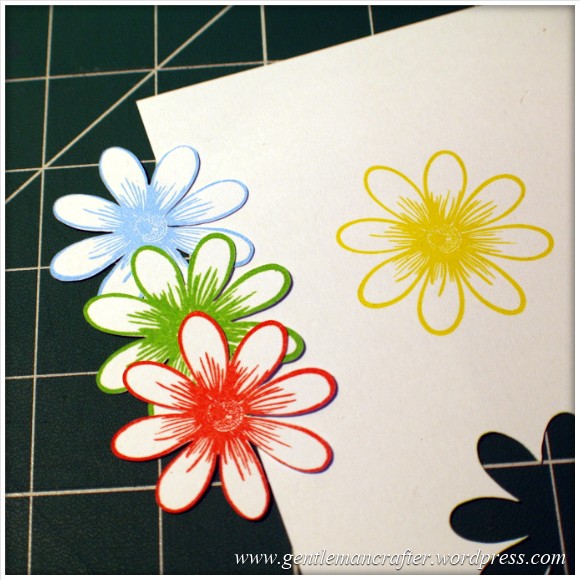
As you can see, the machine picked up three of the colours very well but sadly did not recognize the yellow as there wasn’t enough contrast between it and the paper (in all fairness, this image makes it look a lot brighter than it is in real life – even I was having trouble recognizing it with my eyes).
Conclusion: You don’t have to always print or stamp in black but should consider using ‘bolder’ colours to create the outlines for things that you wish to scan and cut.
Q: Do I have to colour my stamped images in after I have cut them or can I colour them before using the Direct Cut feature?
You can do either, but will need to remember the point above about having a good contrasting outline for the machine to recognize.
Here is the test that I did. One of the kite shapes was coloured (with a graduation of reds from my Spectrum Noir pen set) and the other was left blank.
I also did the Direct Cut process on these shapes at the same time (i.e. I didn’t do one sheet coloured and then one plain).
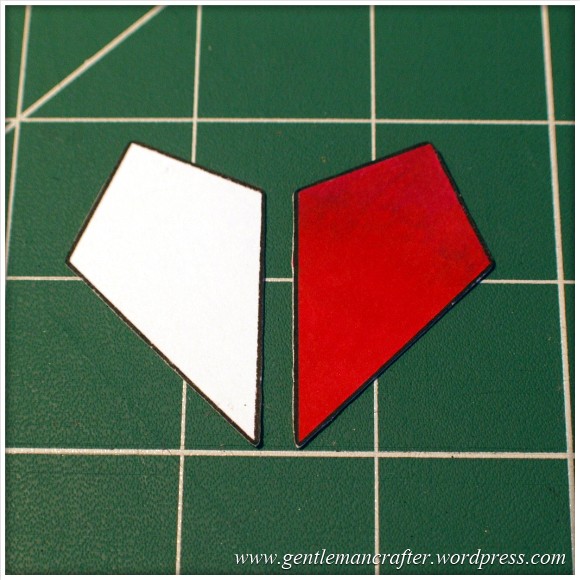
One point though, you will need to be a tidy colourer if you are going to colour before cutting. You can see in the next image how I went over the line and the machine thought that this was part of the outline.
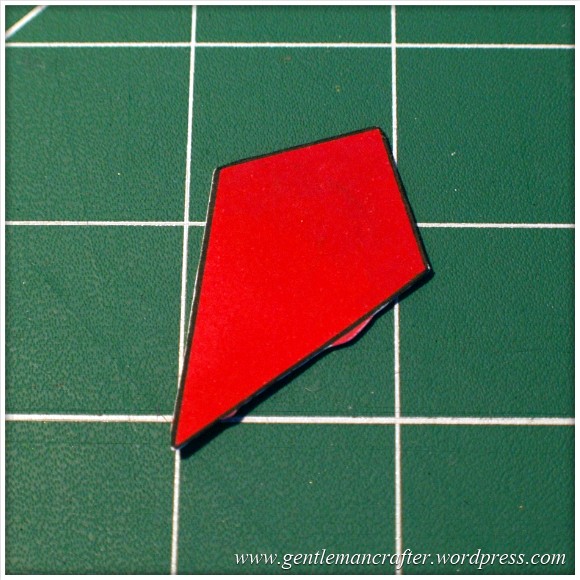
Conclusion: It should not matter if you are colouring before or after the cutting process takes place as long as you have a nice solid outline to the image for the machine to recognize – but stay inside the lines if you plan to colour first! (Lol, flashback to colouring as a child then…)
Q: Can I Use The Direct Cut Feature To Cut Out A Stamped Image That Has Been Heat Embossed?
Yes* (I put the asterisk thing here for two reasons, one, I have only tried it twice and it may depend on a number of things).
The first time that I tried it I used black embossing powder and there were a few flecks out of place. This test did not work.
The second test that I did I used clear powder over a coloured impression. This one work perfectly as you can see here …

Conclusion: I haven’t really done enough testing to give it a 100% tick but initial results look good and testing will be ongoing and I will report back on more results in the near future.
Q: Can I Use A4 Cardstock And Scraps Of Paper And Card?
Yes. Just use the scan preview feature on the cutting mat screen to see where they are on your mat and then you can position your shapes precisely where they need to be – as shown in this image (which could be better – I really need to figure out a way to photograph this screen better).

Q: What Things Will The Machine Cut?
Oy! This list could go on forever! Ok, here are a few that I have tested and seen to work.
- Copy Paper, Vellum, Parchment
- Light (160gsm), Medium (220gsm) and Heavy (350gsm) Cardstock
- Mirror Card, Pearlescent Card, Satin Card
- Crafters Chipboard
- 100% Quilting Cotton Fabric
- Felt (with a fused backing applied)
- Lightweight Faux Leather
- Oil Cloth
- Denim
- Thin Magnetic Sheet (like the kind you print onto to make family photo fridge magnets)
- Shrink Plastic
- Doeflex Template Plastic
- Modelling Sheet (A thin plastic sheet that is maleable when heated).
- Acetate
- Project Acetate
- Craft Metal
Phew, and that’s just a few things!
Conclusion: It’s VERY versatile and will work with you no matter what craft you are into.
Q: Can I Export A Design That I Have Scanned Into The Machine And Then Edit The Lines In The Canvas Design Suite?
Yes. You can see the example below of the scanned image that I used earlier to test intricacy loaded up into the Canvas design suite and the line editing tools selected.

Q: Can the Brother Scan N Cut cut out sheets of printed decoupage?
Probably one of the most frequent questions that I have had.
Tests have been inconclusive. Whilst theoretically possible, it is proving more complex in practice.
As the machine recognizes outlines via contrast between areas of a page, when you have a complex design with multi tonal areas (i.e. a countryside scene or flower) the machine will always do it’s best to find as much as possible but doesn’t always detect the entire outline. In addition, as we would only really want to use the direct cut function, this would not recognise landlocked areas.
There is potentially a way by using an acetate overlay that you can give the machine a helping hand to recognize the overall outline, but again, not sure it would work with landlocked areas. You can see the process I mean by watching this video.
I don’t for a minute believe that it is a fault of the machine, as it has been doing exactly what it was designed to do which was recognize areas of contrast. Instead I think that this might just be a dream featured that has been transposed onto it by our combined desire not to have to cut out all of those fiddly bits.
Conclusion: Tests still ongoing.
Now for some quickfire questions.
Q: Can I ‘Direct Cut’ Multiple Stamped Images In One Operation?
Yes.
Q: Can I Cut A Shape Within A Shape To Create An Aperture?
Yes. Just position them one on top of the other in the design screen on the machine and cut as normal.
Q: Can I Weld A Word Into An ‘Aperture’ So That The Word ‘Hangs’ In The Aperture?
Yes, but you will need to do this in Canvas Workspace and will first need to “subtract” one shape from another to form a frame with an aperture in it before attempting to weld a word into a frame.
Coming Up…
Ok, That pretty much concludes this ‘test lab’. There is clearly much to explore with this machine so I will be doing more in the Test Lab series in the future.
Here are just some of the questions that I have not yet tested but will be looking at in the future …
- Scanning Multi Coloured images
- Direct Cutting With “Busy” images
- Direct Cutting with light ink on dark card
- Can I Cut ‘One Stroke’ Paintings
- 3D creations
- Will it cut foiled designs
- Is there a score/perforate feature?
- Can I cut Zentangle designs?
- What is the test cut button for?
- Can I cut swing cards?
- Is it possible to cut boxes?
I also have other posts planned for this week that will cover using fabric and using the Brother Canvas design suite.
Right, well thanks for reading and I hope that it has helped you in some way.
Look out for more on the Brother Scan N Cut this week.
As ever, if there are any questions that you would like me to add to the list then please feel free to use the comments section below.
John :)
 GENTLEMAN CRAFTER
Hello John,
Do you know if there are any plans for a pen holder that will hold glitter gel pens and glue pens, or if Brother will be doing their own? (Not too expensively I hope).
LikeLike
I have had similar suggestions and have already passed this idea onto Brother.
Fingers crossed :)
LikeLike
Hi again John. Now that my Brother Scan N Cut Machine is on it’s way to me. Can you please tell me when Create and Craft will have the very important ” Scanning Mat” back in Stock. A must so that we Crafters who did not manage to get one of Original Stock. Can make the best use of thier Scan N Cut Machine at once. . I am hoping I get the same almost immediate response from Create and Craft as you got from Brother last time John. Regards Edna
LikeLike
Dear John
As you have already mentioned cutting out decoupage is a frequently asked question. I have Craft Artist 2 so if you use the shadow tool a fine line appears around item. Would the SnC be able to read this line and therefore cut around it. I know not everyone has the Craft Artist 2 so your answers have to be suitable everyone.
LikeLike
That could perhaps be one solution however it may still not work with the land locked areas if you have to use the direct cut function.
I’ll have a go and see.
J :)
LikeLike
Thank you John
LikeLike
After consideration, we have decided that the high hidden costs of consumables for this ScanNcut machine will quickly mount up into Hundreds if not thousands of pounds verry quickly and make it an unacceptable item
The mats only cost pennies for BROTHER to manufacture and yet they want £17 for them, they are only bits of of plastic but they have DOT CODED them as a cynical ploy to force you to buy them. The mats will quickly get shredded as you adjust the blade depth when it gets blunt.
Having to buy non standard pens and scan mats is really taking the mickey.
A pair of scissors and craft knife will do us!
LikeLike
It’s a shame that you choose to look at things that way.
I have successfully got use of one particular mat for three months now and there are ways of prolonging the use that I will be using for all of the mats that I use.
Whilst I have used a couple of new ones here and there for my own reasons this actually works to my advantage as I now have several ‘on the go’ meaning that I’m not using each one as much.
I don’t quite know how you know the manufacturing price of the mats so can only assume you have some inside information that I don’t know about but do feel that having these from the same company is important for many reasons.
Having said all of this it is of course your prerogative to make an informed choice as to whether this machine fits your needs or not. I would never consider ‘pushing’ this on anyone – especially on my personal blog.
I wish you well in your creative adventures and look forward to hearing from you again when perhaps we can talk about techniques, ideas and other happy crafting thoughts?
J :)
LikeLike
Hi John. I Agree with you. After watching you and Mel Heaton using the same Mats for your Create and Craft Demos. I believe The Brother Mats last a lot longer than both the Cricut and Silhouette Mats. Plus the fact that you do not need a Computer cuts cost too. But like you say everyone is entitled to thier own opinion. Regards Edna
LikeLike
I’ve had many cutting machines of different types .. and I can certainly say I’ve never spent thousands or even hundreds of pounds on mats or accessories and as a professional crafter I work my machines hard, often cutting upwards of 80 sheets of cardstock a week! Over a year I can see myself buying maybe two mats and two new blades at most. As all crafters know if you give us a machine or a piece of equipment which is supposed to perform only certain tasks we can usually manage to make it jump through hoops as well so although it might seem to some like an expensive pair of scissors I’m sure that it will pay its way … in my craftroom at least!!!!!
LikeLike
Ref welding words to a frame to create the ‘floating look’ as in the main post. This is possible but as ever with this technique you need to start with a frame ..if you weld a word to a single shape then it won’t work. To make your frame using the Canvas program draw two rectangles and position them one inside the other select all and use the Subtract command. This gives you a solid frame now position your letters or the image over the frame and Weld. This gives you a topper which you can save to your usb and transfer to the machine..if you wish to cut an aperture then you need to eliminate the outer frame . The easy way to do this is to open the design in the machine and it will appear as separate elements so you can delete the outer frame before unifying, scan in your card, position your aperture and cut. This is based on my personal experience of 8 years of using and designing with cutting machines and the various software and I’ve seen that Canvas works in a similar way… so fingers crossed I’m right John !!!
LikeLike
Thank you for sharing that idea. I will give it a go! :)
LikeLike
Anyone who can help please! What is the Brother canvas and how do I access it. Grateful thanks, Beba
LikeLike
It is an online design package where you can design, convert SVG files and jpg images for use in the Brother Scan N Cut.
It is NOT a compulsory requirement to know about or use this in order to use the machine though as it has a lot if standalone built in features.
J :)
LikeLike
thank you so much John. I see that people are using it to practice with before receiving their machines. It would be great to do this. Do I just enter Brother canvas into search engine? Beba
LikeLike
Bemba. There is a link in one of my recent posts on this blog.
LikeLike
Am eagerly awaiting the arrival of my machine. I would like a clarification of ‘exclusivity’ though. We read that it was a European launch, now that Cand C would be the only place that you could buy the machine for all of 2014. This to me seems very strange .. on the Brother UK site it says that the CM600 is the model being commercialized in the UK, if I go to Brother Italy ( I live in Italy ) then the models available will be the CM600 and the CM840 ( same machine but ‘full optional’). My friend is the owner of the local Singer shop and after attending a retailers’ demo session last weekend they were told that they can preorder to be able to sell the CM 840 machine and accessories as from March 1 st. so what sort of exclusive do C and C have as it’s certainly not European, probably only UK and only for the CM600.
LikeLike
Hi Susan. Is the differance in the CM840 Mode to theCM600. Also what do you mean by Full Optional. Regards Edna
LikeLike
Hi John I do a lot of cutting with arty farty templates is it ok to cut them on my scan n cut
LikeLike
You will need to ask Carol Molendo at Arty Farty.
LikeLike
John I have been using the canvas design suite But it doesn’t seem to have all the designs that I have seen on the machine when you and Mel have been demonstrating am I doing something wrong. Thanks John for all you are doing too help.
Connie
LikeLike
I JUST GOT AN EMAIL CONFIRMATION THAT MY BROTHER SCAN n CUT HAS LEFT THE WAREHOUSE!!!! :D #excited
LikeLike
Great news! :)
LikeLike
Me too, getting so excited now, can’t wait for it to arrive.
C
LikeLike
Hi John
Back again. I have been on the ScanNcut canvas site having a play. Can’t find a way to flip shape can it do this?
Also the pre loaded shapes are not shown (only the basic) why is this? When I get the machine delivered will I be able to load this onto USB then load on to the Canvas site Or can I put them onto CraftArtist for editing?? (hope that makes sense).Thought I would prefer to play/edit/create using this as my computer screen is larger.
Julia
LikeLike
I have sent an email to brother asking why the pre-installed shapes are not visible.
LikeLike
John, Mel
We are interested in the scanNcut but have a couple of concerns:
Presenter DEAN said to order a lot of mats as you will “get through them quickly”. I assume that is because as the blade gets blunt you will have to put it to a deeper setting, the tip will then gouge out the mat – surely this a problem? The fact that BROTHER put a dot code on the mat means the machine will not accept a homemade mat? It is going to cost a fortune in mats??? I notice on your demos you always use a fresh mat.
Would not a pair of £5 pair of scissors and/or craft knife do everything this machine does?
LikeLike
As Dean’s comment has been quoted out of context, I can’t really clarify why he said that. He is on Facebook if you would like to ask him about his comments directly.
In terms of mat longevity, this will be down to the amount of usage that it is put to.
The sticky mat is a consumable product on most electronic cutting machines.
There are ways that the life of the may can be extended and both Mel and I have discussed these in shows.
By using home made mats you would probably risk damaging the machine, which would be potentially be more of a costly issue.
LikeLike
Hi John
Have you tried the silhouette stamp material? Great post thanks for all your hard work.
Lynda
LikeLike
No Lynda, I haven’t tried this yet.
LikeLike
hi, john
Is delvery date 10 feb still 100%?
gilly
LikeLike
Despatching from the 10th as advertised.
LikeLike
Hi John,
Can the scan n cut cut out stamps from a rubber stamp sheet like the ones you get from crafters companion, if it does how who I go about doing it?
Thanks
C
LikeLike
Hi John, really looking forward to getting the ScanNCut, I’ve played on the canvas, which I don’t think I would of done, If I’d got the machine first, not a great fan of sitting in front of my computer screen, like to get on and craft. My question is canvas does not convert GSD files, as I have a craft Robo that has only been used a very few times. due to my failing of sitting in front of the computer. Do I need to get my Robo to draw the designs to scan or will canvas be doing an update to incorporate GSD files
LikeLike
I’m not John but maybe can help you. GSD is a proprietary Graphtec file format used in the old Robomaster program which has been succeeded by Silhouette Studio, so think that it is unlikely that it would be taken into consideration however you can screen shot your files save as jpeg then trace in Canvas or print them as pdf files, open in Canvas and convert that way.
LikeLike
Thank you for your help
LikeLike
Hi John, I have established from some SNC users in the US that the machine, when cutting say a stamped image, does in fact cut slightly outside the scanned line – on the right hand side, and slightly in the drawn line on the left hand side. As this is key – scan and then cut, do you know if Brother have a ‘fix’ for this? I ask because my Cameo did this and was Ok after being re-calibrated. Thanks, Dee.
LikeLike
Hi John, thank you for all you do for us, much appreciated.
It would be nice if we could use Gel pens in the pen holder. Also, have you tried Super Smooth Decoupage paper? is so, what sort of setting would you use for that.
I have just received 200 sheets from England and don’t to waste any of it.
I can’t find this anywhere in North America.
Regards
Dawn
LikeLike
Hi John
I understand that the Brother site has a list of compatible USB sticks that work with the Brother ScanNCut, have looked but
can’t find. Have you seen such a list. Eagerly awaiting delivery of the BSC and want to have the correct USB stick ready.
Love watching your all demos.
Sylvia
LikeLike
Here is a link, hope this helps.
Click to access scanncut_usb_r1309.pdf
LikeLike
Hi Sylvia. I have been trying to obtain this information too from both Brother and Create and Craft without success. This is obviously something we need to know urgently as there is already an Up-Date waiting to be Downloaded at the Brother Website. Can somebody in either Company please get this information a.s.a.p. Otherwise Shows and Demos by you John and Mel have been amazing.
LikeLike
I have already emailed brother this morning. I will write up a Reply and post on Facebook this evening so that you all have it.
LikeLike
Hi John. Thankyou for responding so quickly to my Email asking for the List of Memory Sticks we Crafters can use to Download the Up-Dates for the Brother Scan N Cut. I have just received an Email telling me mine has been Despatched and is on it’s way to me. Hooray!!! Regards Edna
LikeLike
Fabulous! :)
LikeLike
Dear John,(sounds like the beginning of a song), please can you help me I’m not very computer literate and would like to know how I can make your lab tests/other work into a file on my desktop so that I don’t have to keep going through a search engine to connect with your site. Sorry if this sounds too inept. Many thanks for all your hard work. Joan.
LikeLike
Hello Jihn. Just a quick question pease. Have you cut Centura Pearl Card on the Brother? If so could you please give the settings required. I buy this card from C & C as I find it useful for die cutting, card bases and the reverse side is brilliant for printing. If you haven’t tried this medium yet, do you think I would use the same settings as adorable scorable card?
LikeLike
I know this might sound like a strange question – can you put the plastic embossing boards into the machine to scan (only scan) in order to copy the patterns from them? I could then copy the scan to the machine (I think?) It would mean me being able to get rid of some of my overcrowded craft items:)
Thank you for your marvellous work on this and also for your patiance.
Pauline
LikeLike
No. This would probably be a copyright breach.
J :)
LikeLike
Hi John,
Ordered the Scanner cut on first week so waiting to try it out, can you tell me if you have a larger design , can you use the large standard cutting mat for scanning , as well as cutting, instead of the standard mat that comes with the machine.
Thanks a lot,
Ronnie
LikeLike
I believe that currently you can only use the 12 inch square mat. Mel will be feeding back to Brother about this as we both feel that it would be a good thing.
LikeLike
Hi John. Do you know if you can download the updates on the Brother website onto a mac? The only operating systems mentioned are windows.
LikeLike
I will check.
LikeLike
Hi John, I ordered the Scan and Cut in the first week of the launch and can’t wait for mine to come so I can play. Do you know if the SNC will cut the metal from the coca cola or any other soft drink cans!!! I have been making a mobile for my sister using the metal, I cut out the shapes with the Grand Caliber and then enamel the shapes with the efcolour enamel…….it works a treat….. but I am limited to the type of shapes or designs, but with the SNC I could scan in any shape or design I wanted, so do you think it would be able to cope with that type of material. I have recorded most of the demos,
Thank you
Ann
LikeLike
I think that Mel mentioned this however I will check.
LikeLike
Hi John, just wondered whether you had managed to check out if the metal on the soft drinks cans can be cut by the SNC, although I have got my machine now, I am a bit scared to try it myself.
Thank you
Ann
LikeLike
I haven’t I’m afraid. It’s still on the list though.
J :)
LikeLike