
*please note – there is now an updated version of this list of links here*
Hello all :)
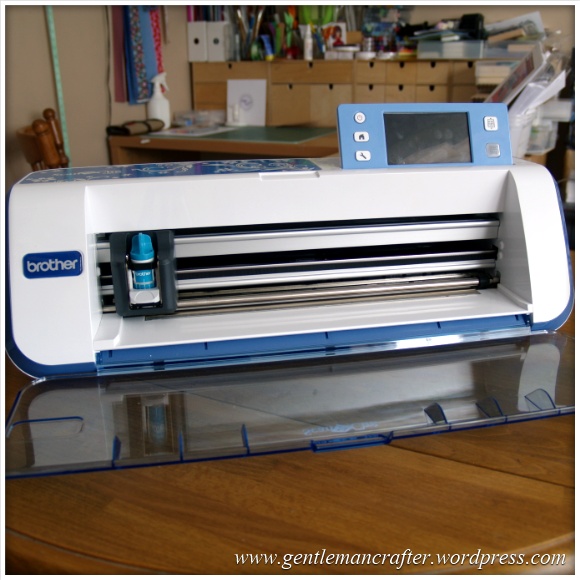
Well, both Mel and I have been overwhelmed by, and grateful for, the positive feedback from the Brother Scan N Cut shows on Create and Craft TV however there have been a lot of frequently asked questions asking for more information.
I have therefore trawled as much of the internet for you and collated a list of useful links that I hope will cover a lot of these FAQs.
Where To Buy
If you are thinking of buying this machine, and are located in the UK, you can get your Scan N Cut machine exclusively from Create and Craft TV.
More Info
Brother Scan N Cut Website
In honesty, a lot of commonly asked questions could be answered with a quick poke around the Brother Scan N Cut website. You can find it by visiting http://www.brother-usa.com/ScanNCut/
User Manual
Not a common request, but probably one that a lot of you could take advantage of. It’s the instruction manual. Yes, the very one that I didn’t bother reading when I first switched on my machine! Might give you some good reading and help you understand how the machine works and what it can really do.
The user manual can be downloaded from here – http://www.brother-usa.com/VirData/Content/en-US/ScanNCut/Consumer/UsersManual/CM100DM_CM550DX_User_Manual_English_1.pdf
Other Documents
Want to see the other documents that are included with the bundle from Create and Craft TV? You can find them all by visiting this support area – http://welcome.solutions.brother.com/bsc/public/eu/gb/en/doc/manual_top.html?reg=eu&c=gb&lang=en&prod=hf_cm600dxeuk
Scan N Cut Canvas
A lot of you have asked for a link to the Brother Scan N Cut Canvas online software so that you can start playing and designing. You can access this by visiting http://scanncutcanvas.brother.com
You will need to sign up for a free account in order to access this. Having the machine doesn’t make a difference, you can start designing now in anticipation of when you do receive your machine. All of the designs that you make will be stored online until you want to download them.
You can transfer your images to your machine by downloading them and putting them onto a USB stick which you can then insert into the machine.
Updates for the machine are likely to be advised here also.
Final link in this section would be to the help file PDF which is located here – https://scanncutcanvas.brother.com/Help/Help_ScanNCutCanvas_EN.pdf
Software Updates
The process for upgrading the software is listed in the instruction manual.
The software update will need to be downloaded onto a USB stick which you would then need to insert in your machine and perform the update.
According to the instruction manual, updates will be listed on the Brother Support website here – http://solutions.brother.com/
I have a feeling that they will also be listed on the home page for the Canvas software.
Videos
Some of you asked where you could see more footage of the machine in action.
Brother have been compiling a series of promotional videos and also videos from other users and reviewers on their YouTube channel. You can access it by visiting http://www.youtube.com/user/BrotherCrafter
Social Networks
I know that a lot of you are on Facebook, Twitter and Pinterest – and so is the Brother Scan N Cut – here are the links.
Brother Scan N Cut on Facebook – https://www.facebook.com/BrotherCrafter
Brother Scan N Cut on Twitter – https://twitter.com/BrotherCrafter
Brother Scan N Cut on Pinterest – https://www.pinterest.com/brothercrafter/
Copyright
There was initially some confusion on social networks and forums about this matter. To clarify, the ownership of this machine does not change the copyrights, terms of use or angel policy of ANY other product or image that you use in conjunction with this machine.
The purpose of having the built in scanning functions is really to give you the ability to design your own so that you don’t have to just rely on things that are already out there – which is a very exciting opportunity to me.
That’s It For Now
Anyway, this should give you lots of reference points no matter what you are looking to find out.
If however you have other questions, please feel free to list them below and (when I get time) I will be sitting down for many play days with my machine and also blogging some of the test results, projects and files for download in the future.
I hope this helps.
J :)
 GENTLEMAN CRAFTER
http://going-buggy.blogspot.fr/search/label/Brother%20Scan%20N%20cut%20calibrating%20machine
for calibrating your scan and cut machine
LikeLike
Hi John. Can you please tell me if there still has only been the one Up-Date for the ScanNCut from Brother so far. Regards Edna
LikeLike
Yes Edna. Just the one. You can check at any time by visiting – http://support.brother.com/g/b/downloadtop.aspx?c=gb&lang=en&prod=hf_cm600dxeuk
LikeLike
Can you still use a mat if it has been cut into ?
LikeLike
You might be able to. It depends on how much and where it’s been cut.
LikeLike
I called Brothers about scanning…WHY DOES IT NOT RECONIZE THE COLORFUL PICTURE…WHY CAN I SCAN AND SEE IT AND SCAN THE SAME ONE AGAIN WITHOUT MOVING AND NOT SEE IT??????/ NOT HAPPY
LikeLike
I am not entirely sure what the image is and what you are trying to do. If you would like to email me an image of what you are trying to scan and let me know what you are trying to achieve and I can certainly try and help.
J :)
LikeLike
I am sure this has been addressed before, but I bought a 12 x 24 standard mat a few weeks ago. Did not try it straight away so its out of return time. When I present it to load it is not recognised by the Scan and Cut. What do I do?
LikeLike
Have you contacted the brother help desk ?
LikeLike
•They say “Clean the dotted marks at the edge of the mat and their surrounding area. If the mat is still not recognized, replace the mat with a new one.” It is a new one!
LikeLike
I would suggest requesting a replacement.
LikeLike
Awaiting C&C as we speak.
LikeLike
I have read each post. My concerns are with the cost of materials needed to produce one piece of fabric cut and one design cut from paper in order to create anything. Have spent almost $100.00 extra on new blades, mats, not to mention fabric cost and still cannot get items to stick correctly and cannot get blades to work correctly either. After many USB purchases finally found one and now that’s a go. It seems as though from your posts and demos that each machine has a mind of its own. It should go back into design and reproduced with the many glitches resolved. Waiting to hear if they will take machine back. If not, Brother can expect many unhappy customers when finally users realize they have purchased a lemon. Although it has great potential it is not there yet. Thank you for allowing me to air my problems and I look forward to other posts.
LikeLike
Thank you for the feedback. :)
LikeLike
Hi John, I would love one of these but having only just started card making and getting married later this year, finance does not allow for one. It would be nice if I could find somebody who would offer the use of there machine until I get one
LikeLike
John
I too have been having problems scanning in my designs, contacted Brother, it seems that if you put your designs to close to the right or left of the mat that you are using for scanning it will not pick up some of the design, you need to be at least 3mm from the
right, top and bottom and 4.3mm from the left side of the mat. I will email you a copy of their scanned reply to me. Also John when my low tack mat is no longer useful, I stick a peice of white card on it and use it as a scanning mat, using a small amount of low tack tape to adhere my design to the mat while I scan . Hope this helps
Margaret
LikeLike
Hi John,
I have tried to download the cutting for my new scan and cut after seeing you on C n C but it says I need to download reg cure to read the files? Can you help pretty please?
Sharron x
LikeLike
Just save directly to USB (using right click menu) and take to your machine.
LikeLike
Many many thanks and for the inspiration on C n C xxx
LikeLike
Oh no, my lovely scan n cut seems to have developed a glitch. A number of times today I switched on to be presented with a blank white screen and the machine was unresponsive. Had to turn off at the mains, wait and switch on again. Anybody else had the same problem? Am waiting to hear back from Brother on this issue … fingers crossed to resolve it … can’t imagine life without this little beauty now!
LikeLike
Sorry to hear that you are having that issue. Not heard of this happening before. Do let me know how you get on with your enquiries at Brother.
LikeLike
Hi John, firstly I hope you are well now! Am hoping Brother will not be too slow to respond as people have suggested that they are. Still having the problem today and worried that it will not do the machine much good to keep turning it off at the mains … what do you think? I don’t want to permanently damage it but can’t bear the thought of not being able to use it for any period of time and not sure what to do now.
LikeLike
Hi John, I heard back from Brother quickly. They say it is probably “something on the main electronic panel” and to return it to C&C for a replacement. I am dealing with Customer Services now but am disappointed I shall be without it for a while. Thanks for all your on-going help and hope to see you demonstrating on screen again soon.
LikeLike
Great to hear that you got a quick answer, but sorry to hear of your situation. Don’t think I’ll be back on screen until May at the earliest – but you never know with live TV, things change from day to day.
Hopefully using the time to come up with some things to pop on the blog though, so it’s swings and roundabouts :)
LikeLike
Hi John. Can you and maybe Mel to, please produce more of the ScanNCut Direct Scan and Scan to Data Instructions and Pictures, you have on your Blog Pages. So I can still continue to Print them for reference etc:- I am sure I am not the only ScanNCut owner who appreciates them. Regards Edna
LikeLike
I have many blog posts in the pipeline.
LikeLike
Hi John
I make metal jewellery – can you tell me what is the thickest sheet metal that I can use with the Scanncut.
LikeLike
Mel and I have only tried one type. This is listed on the materials cutting list.
LikeLike
Hi John
Could you please let me know what freezer paper is used for and how to use it?
Best wishes.
David Price
LikeLike
It acts as a temporary stabiliser to help you with things like English paper piecing.
LikeLike
Deat John,
I am sorry to bother you. I have just bought the large scan n cut mat and I wanted to s and c a bag pattern. The machine kept saying that the mat would not work. Am I to uderstand that only the 12 x 12 mat is to be used for scanning? Don’t get me wrong I do like the machine. Just a little disappointed I can’t seem to get to the bottom of the problem. I boght the large mat hoping I could scan approx 13″ bag pattern. Janice.
LikeLike
This is right. At this time the large mat can’t scan. You can always scan smaller on the 12″ mat & increase to cut on the 24″ mat.
LikeLike
Hi John, can you help please? I have punched a butterfly in black card and scanned it which has scanned lovely, but I cannot for the life of me enlarge it – in fact I cannot enlarge anything. I saw Mel doing this on Create and Craft but it was a little too quick for me to follow. Would appreciate any help.
Regards Kath
LikeLike
I’m guessing that you wouldn’t want to resize a punched image as it might be a breach of copyright on the punch design…
LikeLike
Thank you John.
LikeLike
Hi. John.
Could you tell me if there is a program that will open FCM files, so I can view
them on my computer.
Many Thanks.
Ann.
LikeLike
You can do this via Scan N Cut Canvas
LikeLike
Hi John, i am trying to download the new updates to my memory stick i am a apple user (not got a clue) how to put them on my memory stick i have got something on their already but saying its downloaded as a email so cant go on machine.. grrrrr. Also when will we be able to purchase the other two brooklets that are on the usa web site
LikeLike
Sorry Sue, I don’t know much about Macs. I saw some discussion about this on Facebook but I would recommend contacting Brother via the service desk in order to help you choose the appropriate steps.
J :)
LikeLike
Recently received my Brother Scan n Cut and I love it – a million times better than the Cricut I own (and I use to love that!). I’ve spent hours scanning, cutting and making in my craft studio since I received the machine on Friday, shame I’m back at work tomorrow! I’ve used the Brother Canvas too, a useful tool. My husband hasn’t seen me all weekend, lol. This Crafty Moose has just got even more crafty! :-)
LikeLike
Hi John,
I have been watching the shows and love the idea of this machine but have one question. If I scan in my own image can I then resize it on the machine or do I have to draw it at the size I want as have a few images in mind but at different sizes?
Best wishes
Craig
LikeLike
You can resize it :)
LikeLike
Dear John
I bought the brother to aid me to cut out out stamped images for my cards. I have stamped very simple out lines and the image i did was the kanban stamp image of a teddy bear very simple scanned it and it will not pick up the out line done it over and over but only picks up his nose and the circle round his tummy i have done it on direct cut. I am not selling my cards so i am not saving the images i wanted the machine to save me using scissors but this is not the case please help as i am becoming frustrated and it makes it a very expensive purchase if it is not fit for purpose as you claimed it would take the place of scissors many thanks sue foote
LikeLike
Hi Sue, please could you email me a picture of the image that you are trying to scan so I can take a look?
J :)
LikeLike
Dear John since my question i have got the answer the stamped image was stamped in a dye based ink and the image when looked under a magnifying glass was not a solid line so i filled it in with a micron pen and stamped the image in versa fine black and all is good. other images i have tried that didnt work are now working because although they may appear to be a solid line the scanner is too good and when the image is looked under a magnifying glass is shows not to be solid so if anyone else is having the same problem get a magnifying glass and do what i did and you will have success. so many thanks from a happy bunny who is now no longer frustrated from susan foote
LikeLike
Glad to hear that you have this sorted.
LikeLike
Hi John, thanks for all information you are giving us, but I have just one problem that I cannot solve , Hopefully you can help .I can scan and save to a USB, and its one of the recommended ones, and I have checked on computer to make sure it saved the file, but how can I retrieve the file on the scanncut machine as it shows nothing on the USBb stick
hope you can help me thank you Gloria
LikeLike
It sounds like something you would need to ask brother help desk about Gloria.
LikeLike
Sorry me again.
I have tried to find information on this problem but can’t.
In canvas when I try to download an FCM file, it tells me “some shapes extend beyond
the cutting area (ErrS02)”
That’s not possible as the file is only small and in the middle of the mat, so what is the problem, and how do I fix it.
Thank you.
LikeLike
It may be that the transparent area of a shape extends over the cutting area. Select all of the shapes as a group and the blue line that goes around them all should not go over the edge.
LikeLike
Thank you John will do.
LikeLike
Thank you John, will do.
LikeLike
Just received my Scan N Cut. Where can I get the pen holder and colour pen set in the UK??
LikeLike
You will be able to buy these from C&C when they are back in stock.
LikeLike
Ok. Thank you John.
LikeLike
Hi. John.
Why does it take so long to open an SVG in canvas, to convert to an FCM.
Thank you.
LikeLike
I have no idea Ann. I’d suggest you submit any technical queries to Brother Ann.
LikeLike
Excuse my ignorance but what is an SVG and FCM file please???
LikeLike
SVG – Scalable Vector Graphic. It’s a type of electronic image file format that means that you can increase it’s size without losing the quality of the line.
FCM – this is the standard file format used by the Scan N Cut machine.
LikeLike
Whoops! Think I will need some qualification to understand that. Maybe someone can explain it to us non-teckies on C&C someday!!!!
A suggestion………..how about a DVD on using the Scan n Cut? It would be invaluable to those of us who love it but are struggling to get the best from the machine. Pleeezzeee!!!
LikeLike
I’ll suggest it to the powers that be.
LikeLike