
During recent Scan N Cut workshops I have come across several users becoming quite frustrated with the results they are getting.
Whilst ‘diagnosing’ these issues a common trend has been occurring so I thought it’d be good to show you so that you can perform this very simple check if you are struggling to get clean cuts too.
The tip? Check the tip. The tip of the blade I mean.
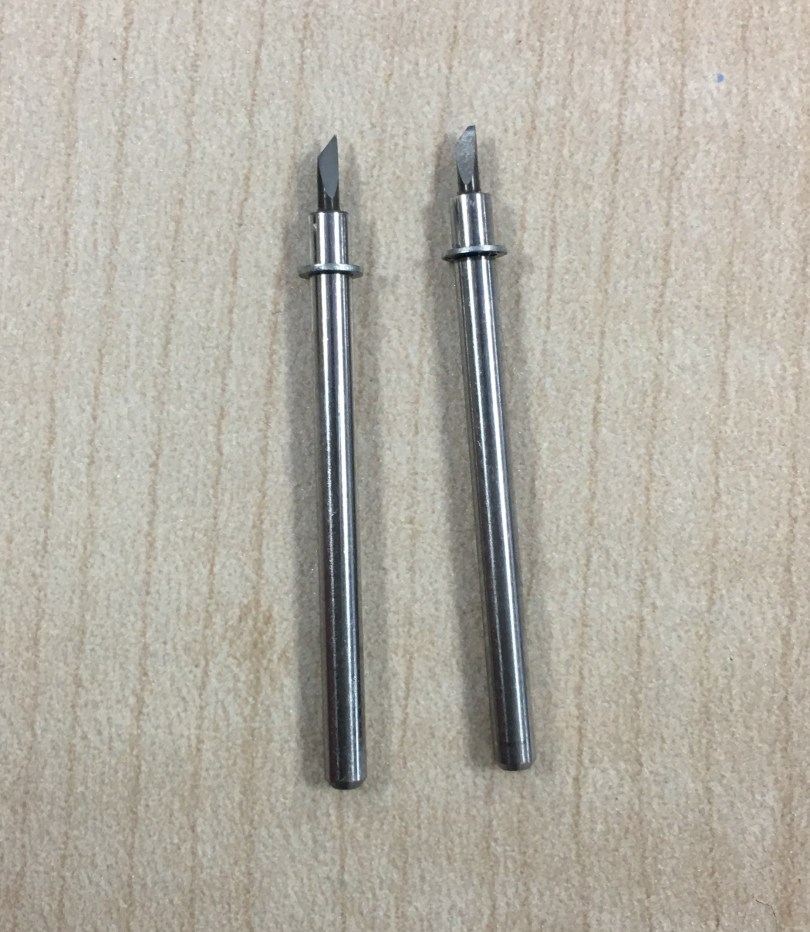
Below is an image of a brand new blade and a blade where the tip has either been worn or snapped. I think you’ll immediately see the difference.
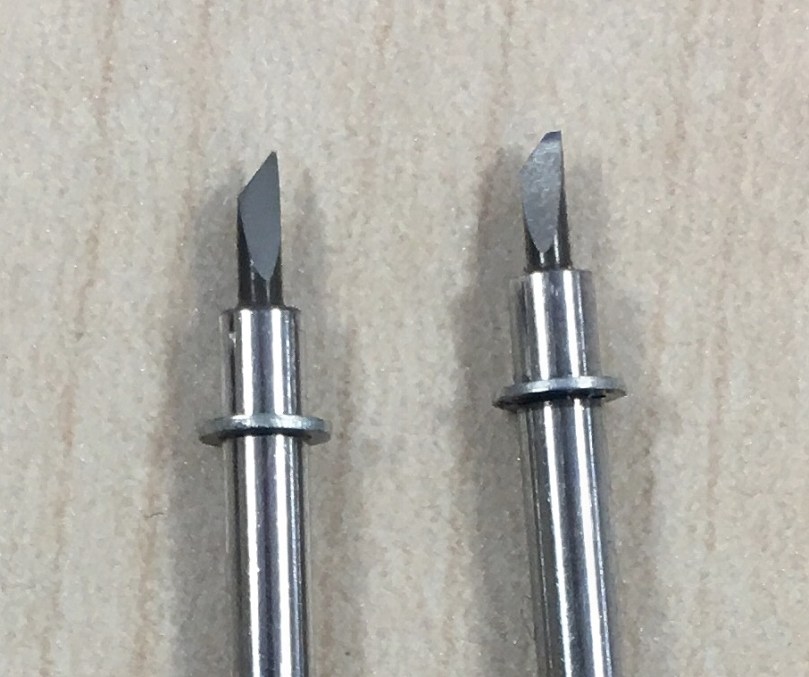
Given that it is the tip of the blade that does the cutting, once the tip is rendered unusable the quality of your cuts will be dramatically affected.
Youll either notice lots of miscuts, snagging especially on corners and potentially having to increase blade depth and pressure quite far just to get a second rate cut.
So, there it is. Check the tip.
How?
Well, it is quite small so here are some basic suggestions.
- If you’ve got good eyesight, you might be able to make it out by eye.
- Use a magnifying glass.
- Take a photo on your smart phone or digital camera and zoom in – that’s what I did for this occasion as I didn’t have my glasses.
Like I said, obvious suggestions but thought it was worth listing them.
Anyway, worth sharing this tip as it could save a lot of frustration. Hope it proves useful.
J :)
 GENTLEMAN CRAFTER
Great advice John. I will use my phone to check the tip in future as it is difficult to see it for me these days.
LikeLiked by 1 person
Loved seeing you again on C&C you always make things look so easy.
Thanks for the tip about blades (When we can get new ones)
You are a inspiration to us all John. Keep up the good work
Hugs Josie
LikeLike
Thanks for your really good advice once again John. I had this problem the second day I owned the scan n cut, but I still don’t understand why it snapped as I was using the same settings pressure on 1 as the day before when it was cutting okay. I bought a refurbished model as I never could have justified spending that much money. I must admit at being disappointed with the machine as I just couldn’t get to grips with it, I am not good with tech stuff and the other half usually sorts stuff out but without the advice and tips you share with us ,I think it would be permanently back in the box. A huge thank you.
Thanks CW
LikeLike
The same applies to craft knives. We do tend to take the longevity of our craft tools for granted. Really admire what you are doing For Mind John well done.
LikeLike
Hi John cracking tip on how to actually see the blade tip…..my eyesight isn’t what it used to be. Thanks for all the time you give to help and assist us craft folk. Enjoy your posts on the craft challenge they always put a smile on my face. Looking forward to the next catch up. Karen x
LikeLike
Thank you John. That is one reason that we love your blog. You give invaluable useable information unlikely to be found elsewhere…..without a frustrating search! Love all that you do. Congratulations on your fundraising. Worthy cause.
Will you be doing any more Scan and Cut workshops in the Newcastle area? (fingers crossed) I see that you are doing one in the west of Newcastle but this seems to be sewing oriented rather than papercrafting. Sorry if I am posting this in the wrong place. Keep up the good work and keep up being the John we all love.
p.s. Love to Maisie!
LikeLike
Maisy says thank you!
Sadly that’ll be the last one in the area for this challenge however keep your eyes on this blog as I hope to do more in the future.
LikeLike
Thank you for your reply. Will look forward to that.
LikeLike
Cheers x
LikeLike
A tip that extends to all cutting machines, as does Beth’s comment above regarding yours and Mel’s advice about the pressure being on 1. If one isn’t enough I re cut or if that isn’t going through put it up by one and re cut.
We really enjoyed the scan and cut show we saw this week (I’d STILL love a scan n cut but for as long as what I have still works I can’t justify it!). Your show gave me a fab idea on finishing some save the date cards I’m doing for my brother, drawing on the final part of the design using my machine. You’ve saved me a lot of work. Loading multiple sticky mats will be so much easier!
Love the last diary, sorry I didn’t comment but energy levels are V. low of late. Big hugs and take care. You’re doing great and the amount you’ve raised is amazing,
T xxx
LikeLike
A great tip John. I seriously complained when I first used my scanncut three years ago as I broke three blades. You guessed it, I blamed the quality of the blade, then, to my chagrin, realised I had set the pressure too high. As you and Mel have said, you should have your pressure at 1…it works a dream.
LikeLike
Mel used to set pressure at 0 I still do that and have excellent cuts x
LikeLike