
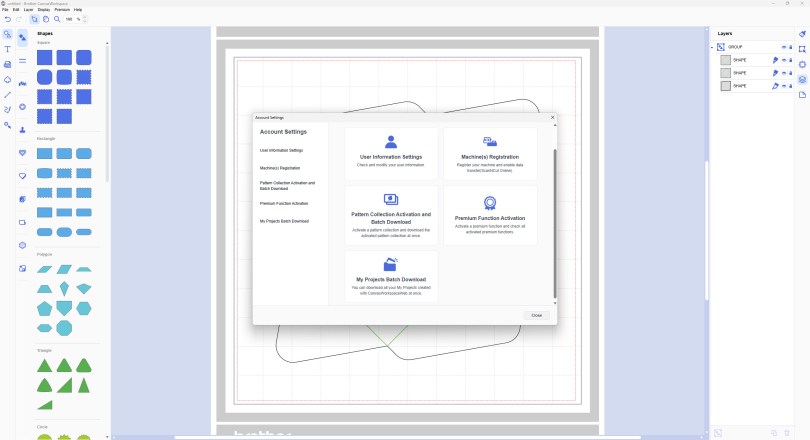
Brother has released Version 2.7.0 of Canvas Workspace for PC (Windows and Mac) and, at first glance, much of the official announcement focuses on changes to account management and the relationship between Canvas Workspace and Artspira.
While those changes are important, the feature that will likely interest most ScanNCut users is something entirely different.
Download Your Content in Bulk Is Now Active!
Until now, much of the content stored in your Brother account was primarily accessed through the Canvas Workspace for Web version.
This included:
- My Projects
- Pattern Collection designs
- Disney designs
With the latest update, Brother has added the ability to download all of this content directly from the Account Settings area in the desktop version of Canvas Workspace.
For users with large libraries of projects, this could save a considerable amount of time and make sure that you retain those purchased pattern collections too!
Why This Matters
Many ScanNCut users have built up extensive collections of projects over the years.
Having easier access to those files means:
- Simpler backups of your creative work
- Faster access to purchased and created content
- Greater peace of mind knowing your files can be stored locally
For anyone who has ever worried about losing access to a favourite project, having a local copy is always a good idea.
Here is a video showing the update and batch downloading in progress.
Artspira Integration
The other major change in this update is that Brother is continuing to integrate Canvas Workspace and Artspira.
Depending on how you currently use the two platforms, you may be prompted to link or confirm your account information the next time you sign in.
For most users, this should be a straightforward one-time process and should not affect existing projects or machine operation.
An additional feature now available in Canvas Workspace for PC is the ability to transfer a design to Artspira. This has been added to the File Menu > Export/Transfer FCM file… options.
Windows 10 Support Ends
One item worth noting is that Brother has officially discontinued support for Windows 10.
Canvas Workspace may continue to run on Windows 10 systems, but future compatibility and technical support are no longer guaranteed.
If you’re still using Windows 10 with your ScanNCut, it’s something to keep in mind before installing future updates.
My Thoughts
For me, the most interesting part of this update isn’t the account changes—it’s the improved access to stored content.
The ability to download My Projects, Pattern Collection and Disney content directly from the desktop application is a welcome addition and makes it much easier to keep your own backup copies of important files.
The account-linking changes feel more like behind-the-scenes housekeeping, whereas the new download options provide a tangible benefit that many ScanNCut users can take advantage of immediately and should do so before the retirement of Canvas Workspace for Web in October 2026.
Have you installed Version 2.7.0 yet? I’d be interested to hear whether you use Canvas Workspace, Artspira, or both—and whether the new bulk download feature is something you’ll use.
Whenever Brother releases a software update, it’s easy to worry that major changes are coming or that you’ll need to learn an entirely new workflow.
Fortunately, that’s not really the case here.
This update is primarily about improving account management and strengthening the connection between CanvasWorkspace and Artspira. Most users should be able to continue creating, cutting and crafting exactly as they always have.
If you’ve already installed Version 2.7.0, let me know in the comments whether the update went smoothly and whether you’ve linked your CanvasWorkspace and Artspira accounts yet.
More Useful Scan N Cut Stuff
If you found this information useful, you may also like to check out these other resources …
My dedicated Scan N Cut Tutorials YouTube channel, by playlist.
- Scan N Cut Tutorials (CM Models) Playlist
- Scan N Cut Tutorials (SDX Models) Playlist
- Canvas Workspace (for PC) Playlist
- Canvas Workspace (for Web) Playlist
- Canvas Workspace (for Mobile) Playlist
Please remember to like, subscribe and for notifications of future videos, hit the bell notification icon too!
Facebook Group
If you’d like to join a growing group of Scan N Cut enthusiasts then please do come and join Gentleman Crafter’s Scan N Cut Facebook Group at https://www.facebook.com/groups/gentlemancrafters.scanncut.group/
SVG Cutting Files
Want access to a growing library of ready-to-cut projects including layered frames, creative card bases and fun 3D projects? Then please do come and check out my Patreon page at https://www.patreon.com/GentlemanCrafterUK
More Blog Posts!
I have a stack of posts on this blog featuring tips, tricks and tutorials so please do have a dive into the archives – thank me later!

Share the love!
If you find this post fun, entertaining or useful, please do consider sharing it to your fave social platform using the handy buttons below.
Also, if you are feeling flush, a coffee wouldn’t go amiss! *cheeky wink.


Ok, that’s it for this post. I hope that you have enjoyed your time here today and will subscribe to my email newsletter so that you can hear about future posts.
If have not already done so, please feel free to pop your email address in the box below and I will add you to the list (you can unsubscribe at anytime in the future if I bore you with too many).
In the meantime, thanks for stopping by and I look forward to seeing you next time!
Much love,
John.


No worries. The place to download in bulk is in the downloaded version of Canvas Workspace so you’ll need to download, install and sign in to that. You do not need to use artspira but the new login screen for Canvas Workspace implies that an artspira account may be required – it isn’t you just sign in with your existing Canvas Workspace account. Hope this helps.
LikeLike
Good Morning John,
I’ve been watching Your tutorial on how to do a bulk download of all our Canvasworkspace projects and I am getting bit lost. I have ALWAYS used canvasworkspace(web ) version I tried the PC version briefly but was not all that keen on it (will now have to bite bullet, and learn it). I Do not use Artspira at all, and never will. I am looking to download all my (WEB )projects on to the PC version and use that program instead. But i can’t seem to find a way to do that, it seems I have to use Artspira. I’m not interested in using artspira. I have already downloaded a number of my Projects from the web version but it means having to do each one individually as opposed to doing bulk download,can you offer any help advice. My apologies if I have posted this in the wrong place.
LikeLike
Hi John,
Many thanks for your updates.
Just downloaded all of my patterns etc.
LikeLike