
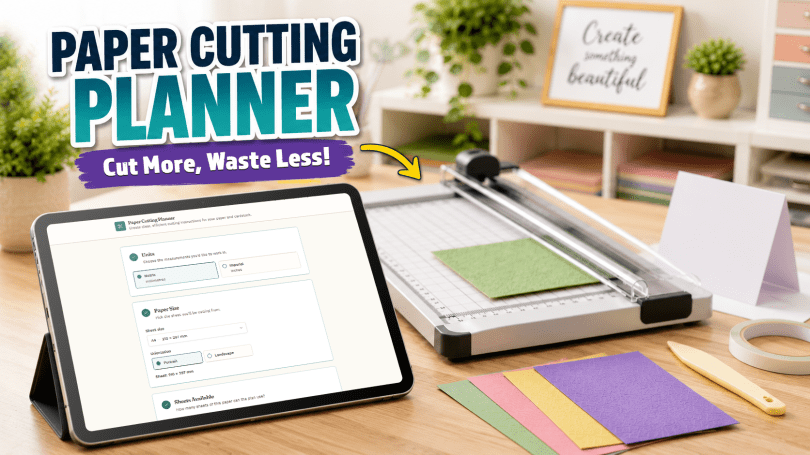
If you have ever stood at your paper trimmer or guillotine with a sheet of cardstock, a list of measurements and the quiet confidence that you can work it all out in your head, you probably already know where this is going.
A few minutes later, there are measurements scribbled on scraps of paper, a calculator open somewhere nearby, several increasingly questionable little diagrams and the uncomfortable suspicion that the very first cut you made has just ruined the entire plan.
We have all been there.
And that, really, is the problem that eventually led to the Paper Cutting Planner – if you cut card or paper regularly in your crafts, you need this!
(Ps, it’s free to use).
It Started With a Facebook Question
Like many of these things, the idea did not begin with a grand plan to build an app.
It began with a Facebook question that I posted on my Gentleman Crafter page where I asked what apps you would want to help in your crafty lives.
There were quite a few comments and responses with some awesome (although probably not yet feasible) ideas – one of which was creating an app that would help you cut pieces cardstock as efficiently as possible.
It was one of those comments that quietly takes up residence in the back of your brain.
At first, it sounds like a simple maths problem.
You have a sheet of paper.
You know the sizes of the pieces you need.
Surely it is just a case of working out how many will fit?
Well… yes.
And no.
Of course there would be a no.
Because the real question is not simply:
Will these pieces fit on this sheet?
The much more useful question is:
What order should I make the cuts so that I get everything I need, waste as little paper as possible and do not accidentally make the remaining pieces impossible to cut?
That was the seed of the idea.
A big seed, like a coconut of a seed, but still a seed.
Even if a coconut isn’t a seed. Is it? I don’t know.
A Simple Idea That Became Slightly Less Simple
My first thought was that this could perhaps be a straightforward calculator.
Choose the size of the paper, enter the dimensions of the pieces and let the calculator work out how many fit.
Simple.
Except, as is often the case, the moment you start thinking about how people actually work, the simple idea becomes considerably less simple.
What happens when you need several different sizes of card or paper?
What happens when you need eight of one size, four of another and two of something else?
What if the paper has a directional pattern?
Can some pieces be rotated?
What if you are working in millimetres rather than inches?
What if you are cutting A4 cardstock, US Letter or 12 x 12 paper?
And, perhaps most importantly, what if the mathematically most efficient answer produces a cutting plan that makes absolutely no sense when you are standing in front of a real paper trimmer?
It turns out that “just fit some rectangles inside another rectangle” can become surprisingly involved.
We don’t make things easy for ourselves, do we, lol!
*sigh
From Calculator to Planner
That was the point at which the idea shifted.
I did not want the app simply to tell you that the pieces could fit.
I wanted it to tell you how to cut them.
The focus therefore became much more practical.
The planner needed to think about efficiency, but it also needed to think like somebody using a guillotine or paper trimmer – well, at least keep the thoughts about the trimming and not ‘did I put the dinner on?’
Anyway, the guiding idea throughout development became:
Simple to enter. Simple to understand. Practical to follow. Designed to waste less paper.
There has been a great deal of testing, changing, simplifying and occasionally staring at rectangles for far longer than any sensible person probably should but throughout the development process, one question kept coming back:
Would this actually make sense to somebody standing at their craft table with a sheet of cardstock in front of them?
If the answer was no, it needed changing.
So, What Does the Paper Cutting Planner Actually Do?
The Paper Cutting Planner is designed to take the mental juggling out of planning your cuts and minimising waste where possible.
What do I need to use it?
Not much — if you’re reading this on the internet, you’ve likely got everything you need already because Paper Cutting Planner works on most modern computers, laptops, tablets and phones using an up-to-date web browser such as Chrome, Edge, Firefox or Safari.
You’ll need an internet connection to open the planner because it is an online app, but the clever number-crunching happens on your own device.
There’s nothing to install, no account to create and no password to remember.
In other words: if you can comfortably browse the web today, you can most likely use the Paper Cutting Planner.
How Does the Paper Cutting Planner Work?!
Fair question to ask. Well, it is REALLY very easy – for you. Let me take you through it step by step.
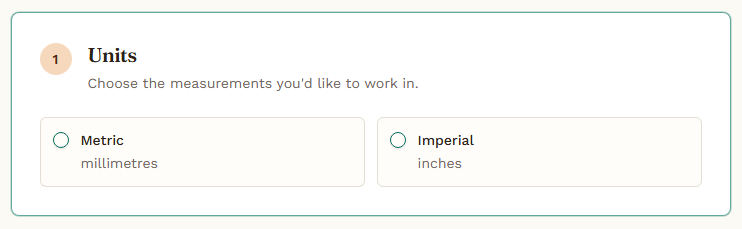
1. Choose the measurement units you usually work in
Start by choosing the measurement system you prefer to use – most likely the one your paper trimmer or guillotine also uses.
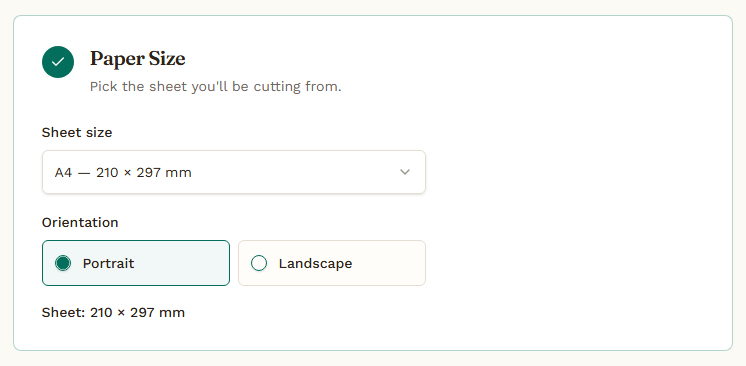
2. Choose the paper size
You choose from a list of common paper sizes, such as A4, US Letter and 12 x 12 as well as a custom size option – perfect for using larger, irregular scraps.
3. Tell it how many sheets you have available.
If you only have two or three sheets of card or paper, there’s no point in generating instructions for four sheets.
Tell the planner how many sheets you have and it will tell you if the pieces you need can be cut from that amount.
Got loads? Lucky you! Anyway, just tell it you have an unlimited supply and it will tell you how many of that unlimited stash you will need.
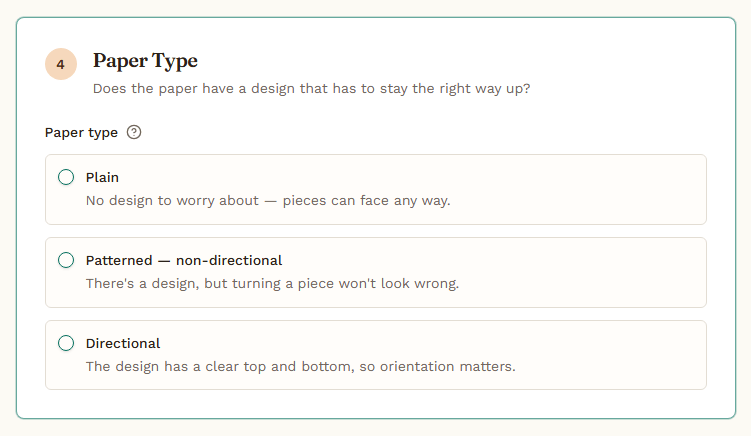
4. Let the planner know if you are using plain or patterned paper.
Not all paper can be treated in exactly the same way.
If you are using plain cardstock, rotating the card while cutting is usually not a problem.
If you are using patterned or directional paper, however, turning one piece sideways may suddenly put flowers, words, stripes or little Christmas trees in completely the wrong direction.
The planner can take those restrictions into account.
5. Tell the planner what pieces you need
Enter the width, height and quantity of each piece that you need.
At present you can’t mix and match different types of card and paper but you can cut all sorts of square / rectangles from the same sheet(s) and then start a fresh ‘job’ for the next set of parts.
So, for example, you could do all of your mats in one pass, and then all of your layers in another.
I will be looking at mixing and matching parts in future updates so you can create a single job for all of the paper parts you need for your project.

6. Let the planner work it out & follow the instructions
Once the information has been entered, with a single click, the planner works out an efficient cutting approach and determines how many sheets are required.
The aim is not only to reduce waste, but also to keep the resulting cutting sequence practical for use with paper trimmers or guillotines.
The instructions where the part I particularly wanted the app to get right.
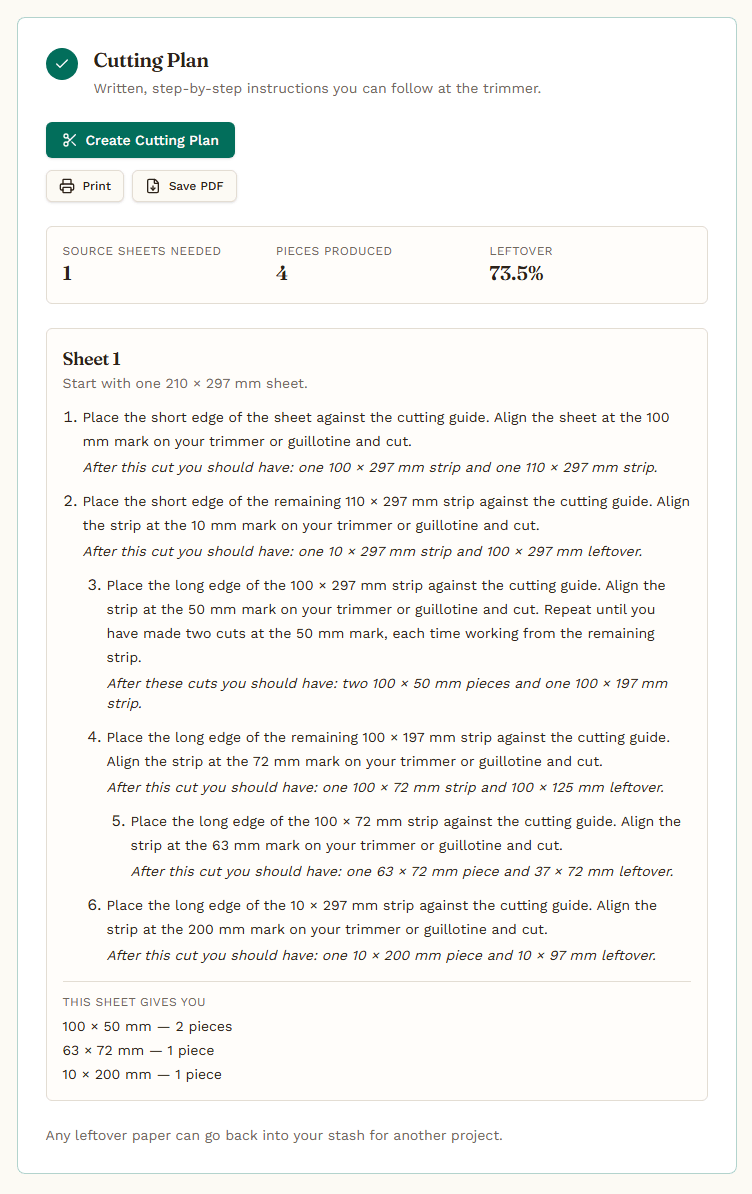
Rather than presenting you with a complicated optimisation diagram and expecting you to decipher it, the Paper Cutting Planner gives you a clear sequence of cuts that you can follow at your trimmer – in very simple terms.
In other words, the clever bit happens behind the scenes.
You get the useful bit.
Oh, and if your craft room isn’t near the device you create the instructions on there is an option to print the instructions out.
Here is an example of the directions for the requirements that I chose in the examples above…
What Could You Use It For?
Although the original idea came from cardmaking, there are plenty of situations where the planner could be useful.
To name a few in a neatly arranged bullet point list …
- cardmaking;
- scrapbooking;
- invitations;
- matting and layering;
- batch card production;
- workshop preparation;
- paper craft projects;
- cutting repeated pieces for kits or classes.
And while saving half a sheet of cardstock here or there may not sound particularly dramatic, those little savings soon add up.
That becomes especially noticeable when you are working with speciality cardstock, foiled papers, patterned collections or large batches of pieces.
There is also another sort of saving that is rather harder to measure.
Time.
Head-scratching.
Repeatedly checking measurements.
And the occasional muttered comment aimed at a paper trimmer after discovering that you should have made the previous cut half an inch further over.
A Small Tool Built for Crafters
The Paper Cutting Planner was created to solve a very ordinary crafting problem.
It is not intended to make something simple feel complicated.
Quite the opposite.
The idea is that you enter what you have, tell it what you need, get a sensible cutting plan and then get back to the enjoyable part: actually making something.
And I should probably return to where this story began.
So, thank you Facebook friends!
One Facebook comment turned into rather more coding, testing and rectangle-related thinking than either of us probably expected.
But without that comment, the Paper Cutting Planner might never have existed.
The long story short … too late.
The Paper Cutting Planner was created to help answer one simple question:
How do I cut all of these pieces from my paper without using more than I need to?
It can help you:
- work out an efficient cutting plan;
- handle multiple piece sizes and quantities;
- take paper direction and rotation into account;
- work with common metric and imperial sheet sizes;
- and turn the result into practical cutting instructions you can follow at your trimmer.
No graph paper.
No increasingly frantic arithmetic.
And, hopefully, rather fewer moments of realising that the first cut has made everything else considerably more difficult.
Give the Paper Cutting Planner a Try Yourself!
Version 1 of the Paper Cutting Planner is now ready for you to try so, the next time you have a collection of card panels, mats, layers or other paper pieces to cut, why not let the planner do the head-scratching for you.
You can access it by clicking the button below.
I hope the Paper Cutting Planner saves you some cardstock, a little time and perhaps the occasional unprintable comment aimed at your paper trimmer.
In the meantime, if you find it useful, please consider sharing it with your crafty friends, mentioning it in your craft groups or passing it along to anyone who regularly spends far too much time trying to squeeze one final rectangle out of a sheet of cardstock.
The Paper Cutting Planner has been independently developed by me and I hope to continue improving it over time.
If you enjoy using the tool and would like to support that work, you can also make an optional donation to the development fund. Every contribution helps towards the ongoing development, maintenance and creation of future tools for crafters – or fuel my brain with more coffee as I bash away at the keyboard, or my head against a wall, lol!
All of the links to do any of the above are shown below.
Share the love!
If you find this post fun, entertaining or useful, please do consider sharing it to your fave social platform using the handy buttons below.
Also, if you are feeling flush, a coffee wouldn’t go amiss! *cheeky wink.


Ok, that’s it for this post. I hope that you have enjoyed your time here today and will subscribe to my email newsletter so that you can hear about future posts.
If have not already done so, please feel free to pop your email address in the box below and I will add you to the list (you can unsubscribe at anytime in the future if I bore you with too many).
In the meantime, thanks for stopping by and I look forward to seeing you next time!
Much love,
John.


Hi John, I’ve had a little go with it and noticed that A4 is only on CM paper size, when I use mostly inches. Any chance the A4 size can be added to the inches paper sizes? I have done it as a custom size to try it out. If not could we get the option to save custom sizes which we use regulary, I would love an option to save A4. It works well just this would make it simpler for me anyway. Thanks John, I look forward to your reply
LikeLike
I will definitely be expanding the list of pre-set sizes in Version 2 so will add this to the list – I am imagine you are not the only one that works in both units (I do too).
In the meantime, you are on the right track for a temporary workaround – if you set the units as inches, choose “custom” from the paper size options and enter either w. 8.27 inches × h. 11.69 inches (for portrait orientation) in the boxes (or flip them if you want landscape) this should give you what you want for the time being.
With regards to “favourites” I might be able to go one better because in Version 2 or 3 I am actually hoping to be able to add “save project” so that you can just call up previous settings for projects you do time and again. Will certainly look at adding a faves selector for sizes too!
If there is anything else you think would improve the tool, please feel free to shout!
Many thanks for the kind words, coffees and feedback – all very much appreciated.
LikeLike
Thanks very much John xx
LikeLike
Sounds awesome, John. I shall give it a try xx
LikeLiked by 1 person
Hi John!
This sounds like an amazing tool and I will certainly give it a try soon.
Thanks for all your hard work, bringing it to us.
Quick question; On the ‘Pieces to Cut’ screen, there is a switch marked Rotate. What is it for? It looks as though you can switch it on and off on that screen.
Cheers, Clare.
LikeLike